Homegate Data: A Daily Snapshot of Two Cantons with 46K Photos
Every day, a full snapshot of all active Homegate listings in one Swiss region, with photos and PDFs, for a company's own listing-history database.
Learn More
MLS.com is not a local MLS: it routes visitors through state and metro directories and hosts its own South Florida search. Our MLS.com scraper collects both.
Plans from €169/month · Free project assessment · Reply within 1 business day
You tell us what the extract should cover - a set of states and metro areas, a list of South Florida cities, the statuses and property types that matter - and we build, run and repair the crawler. There is nothing to install and no selectors to maintain on your side.
The crawler follows MLS.com the way the site is built: from the state pages to the metro areas, and into the South Florida search, where it pages through every combination of status, property type and price band you ask for. Rows are keyed on the Listing ID, so a home that turns up under two filters is delivered once. Pacing, proxy rotation and page rendering are part of the service. Runs are one-off or scheduled daily or weekly, and each delivery comes with field documentation.
Most of the listing data MLS.com publishes under its own name sits in the South Florida search, which opens from the city links on the Miami / Fort Lauderdale Area page. Each result card carries a photo, the price, the address and the room counts; View Details opens a panel with the status, the Listing ID and a photo carousel. Our MLS.com scraper reads the card and the panel and returns one row per listing.
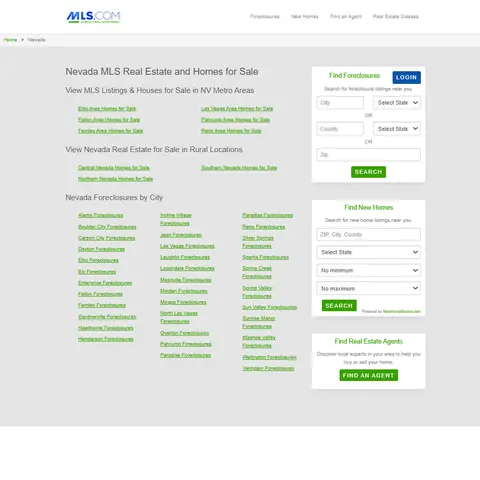
Elsewhere the state and metro pages work as a directory: they list cities and send most Homes for Sale links on to a partner search. We map that directory - state, metro area, rural region, city - so coverage is agreed before the first run. Agent names and phone numbers, wherever they appear, are left out by default.
Status is where MLS.com data gets useful. The South Florida search keeps Closed and Rented listings searchable next to Active ones, so one extract can hold today's asking prices and the homes that already sold or let in the same building or ZIP code. Run it on a schedule and each Listing ID gains a first seen date, a last seen date and the day its status moved from Active to Closed or Rented, with any price change in between.
Coverage is planned by slicing. The search filters by city - Miami, Fort Lauderdale, Boca Raton, West Palm Beach, Cape Coral, Port St. Lucie and many more in its city list - and by price range, minimum beds and baths, and property type. We split large cities into those slices, merge on Listing ID and report each slice's row count next to the result total the search displays for it.
The rest of the site is mapped as a directory: every state page, its metro areas and rural regions such as Hill Country or Piney Woods in Texas, the city lists inside each metro, and the Foreclosures pages by state and city. That gives you the geography MLS.com itself uses, ready to match against the listings.
MLS.com is run by Multiple Listing Network, which describes itself as a real estate advertising and listing service company, under the name America's Real Estate Portal. Despite the domain it is not a multiple listing service: its own footer states that MLS.com is independently owned and not affiliated with the local MLS systems. Read its data as a portal, not as the record of any local board.
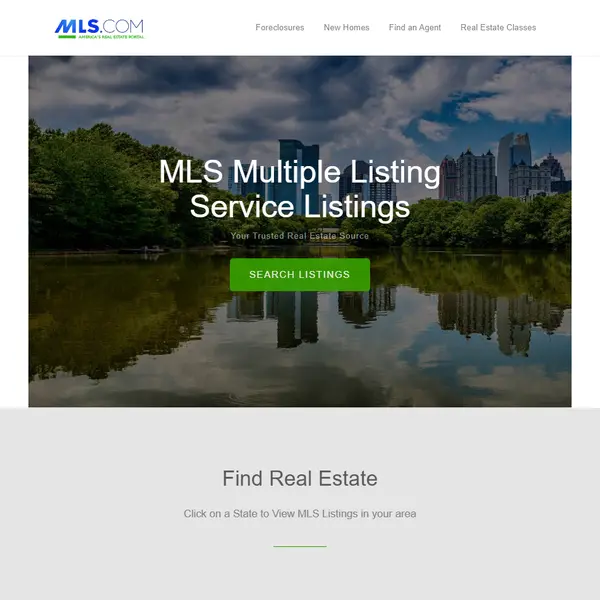
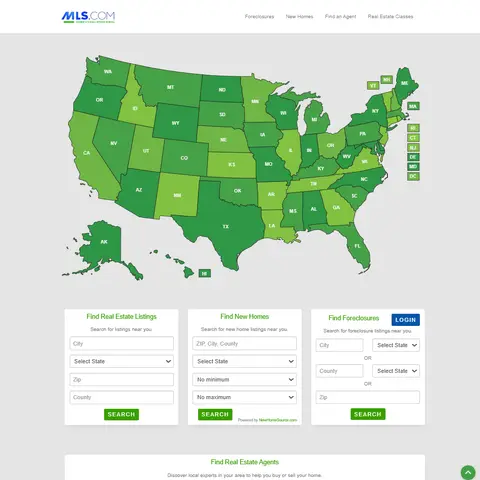
The home page opens on a state picker. Each state page lists its metro areas, often its rural regions too, and each metro lists its cities. Florida adds something extra: a South Florida search hosted on MLS.com itself, with result cards, filters for city, price, beds, baths, property type and status, and a detail panel per listing. Most other paths lead to partners - New Homes is powered by NewHomeSource.com, Find an Agent opens RealEstateAgents.com, and city searches and Foreclosures run through a co-branded foreclosure search with its own Login.
Real Estate Classes, a Glossary and Seller/Buyer Info pages complete the site. For a data project that means one decision up front: the South Florida listings, the national directory, or both, because they are different shapes of data.
Get a Quote
Developers

Customers worldwide

Pages extracted

Hours saved for our clients
€199 / one-time
setup fee - included
€169 / mo
setup fee €499
€229 / mo
setup fee €499
€349 / mo
setup fee €499
€549 / mo
setup fee €799
Delivery: CSV, JSON or XLSX files, our API or a JSON feed. MCP server on request.
Full plan details →The South Florida search covers one region, but its mix of statuses and property types answers questions that a for-sale-only feed cannot.

Every day, a full snapshot of all active Homegate listings in one Swiss region, with photos and PDFs, for a company's own listing-history database.
Learn More
A real-estate analytics company got two portals archived listing by listing: the saved page, a JSON file and every photo, 420K+ listings in all.
Learn More
US real-estate investors get agent lists for their markets from MLS portals under their own 2FA logins, plus realtor.com and Zillow directories.
Learn MoreLearn how to use web scraping to solve data problems for your organization

Real estate teams work in a fragmented data landscape. The sites that drive demand in Boston look nothing like the ones that matter in Berlin, São Paulo, Dubai, or Mumbai.

Real estate teams are operating in a data environment that is bigger, faster, and more fragmented than ever. Listings go live and disappear in hours, price cuts happen quietly, and the portals that matter most in each country are rarely the same global “top 5.”

Six jobs that scraped property data does, each backed by a ScrapeIt project: seller leads, listing monitoring, image datasets, weekly market supply, sold records and unit-level rentals. For every use case - the fields it needs and how often to refresh them.
ScrapeIt is a managed web scraping agency. We build and run crawlers for property portals, classifieds and marketplaces, and we deliver data rather than a tool. MLS.com is a site whose name suggests one thing and whose structure is another, so half the job is mapping which pages hold listings and which only point elsewhere. Every dataset ships with field documentation, and a sample can be ordered before anything goes on a schedule.
Yes. The ScrapeIt MLS.com API serves Listing ID, price, address, beds, baths, property type and status as JSON from an endpoint we host, updated on the schedule you choose. The same rows can also arrive as CSV or Excel files, over SFTP or into Amazon S3, or loaded straight into your database.
Yes. The South Florida search, the state and metro directories and the Foreclosures city lists open to any visitor without an account. We collect only publicly available data - everything a visitor can see on MLS.com - and we collect it legally. Agent names and phone numbers are personal data, so they stay out by default.
Yes, in the South Florida search. Its status filter offers Active, Rented and Closed, so sold and leased homes stay searchable with their price, address, beds and baths. We deliver status as its own column and can limit an extract to one status or keep all three.
Outside the South Florida search, MLS.com itself holds a directory rather than listings: state pages list metro areas and rural regions, metro pages list cities, and most Homes for Sale links pass the visitor to a co-branded foreclosure search on another domain. We deliver that directory as data - state, metro, city and where each link leads - and treat the partner search as a separate source, scoped in the free project assessment. We never log in, so anything behind its Login stays out.
For the directory of states, metro areas and cities a monthly pass is usually enough. In the South Florida search listings change status from Active to Closed or Rented, and daily runs give the cleanest first seen and last seen dates per Listing ID. Plans start from EUR 169 a month, or EUR 199 for a one-time extract.
Step 1 - Make a Request
You share your needs, expectations, and desired timeframe. We’ll suggest the best solution based on your request and budget.
Step 2 - Configuring Custom Web Crawlers
Our specialists configure the crawlers and extract a sample dataset for your review before proceeding with the full-scale extraction.
Step 3 - Collect and Deliver
Once you approve the sample, we launch the project and start full data collection. We gather, filter, and structure the data for easy use, delivering it on time in your preferred format.
Step 4 - Maintain and Support
Our team manages ongoing processes, monitors website changes, and supports all data extraction cycles. We can also help integrate data into your systems or create dashboards to simplify analysis.
MLS data from €169/month. Free project assessment, reply within 1 business day.

Scrapeit Sp. z o.o.
10/208 Legionowa str., 15-099, Bialystok, Poland
NIP: 5423457175
REGON: 523384582


