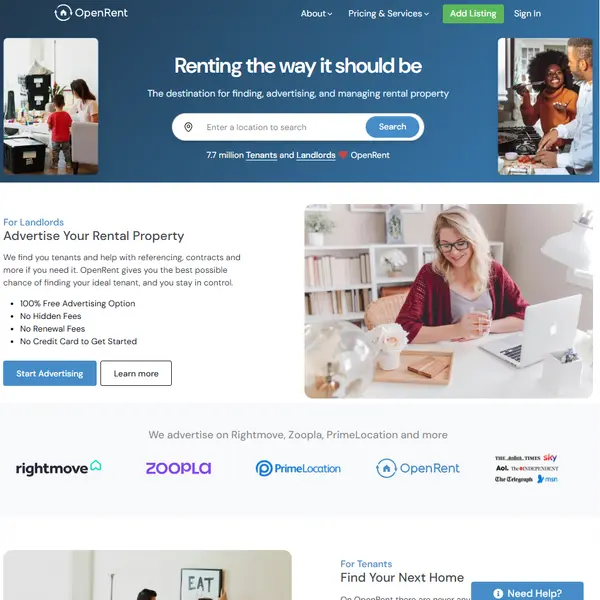
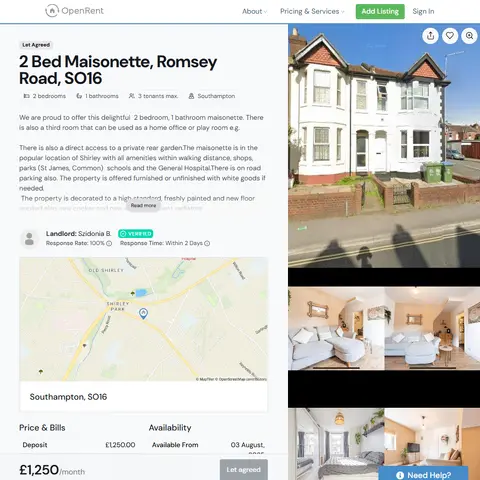
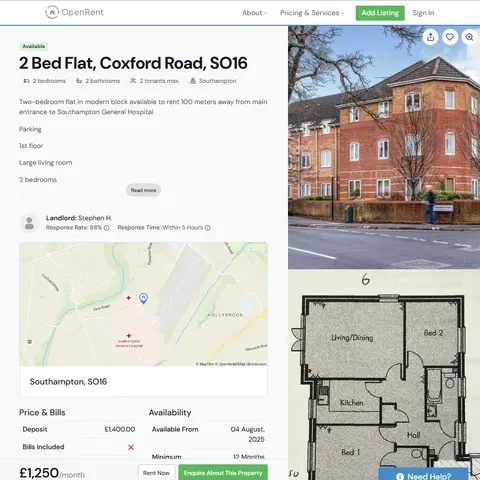
<!DOCTYPE html> <html lang="en"> <head> <meta charset="utf-8"> <title>OpenRent Data Scraper | ScrapeIt</title> <meta name="description" content="Scrape OpenRent data with ScrapeIt — clean rental listings, rent trends, and property info delivered in your format, no setup required."> <meta property="og:title" content="OpenRent Data Scraper | ScrapeIt"> <meta property="og:description" content="Scrape OpenRent data with ScrapeIt — clean rental listings, rent trends, and property info delivered in your format, no setup required."> <meta property="twitter:title" content="OpenRent Data Scraper | ScrapeIt"> <meta property="twitter:description" content="Scrape OpenRent data with ScrapeIt — clean rental listings, rent trends, and property info delivered in your format, no setup required."> <meta content="https://www.scrapeit.io/assets/img/real-estate/openrent-scraper-1.png" property="og:image" /> <meta content="https://www.scrapeit.io/assets/img/real-estate/openrent-scraper-1.png" name="twitter:image" /> <meta content="https://www.scrapeit.io/real-estate-scrapers/openrent" property="og:url" /> <link rel="canonical" href="https://www.scrapeit.io/real-estate-scrapers/openrent" /> <meta property="og:type" content="website"> <meta content="summary_large_image" name="twitter:card"> <meta content="width=device-width, initial-scale=1" name="viewport"> <link href="/assets/css/main.css?ver=1.08" rel="preload" as="style" onload="this.onload=null;this.rel='stylesheet'"> <link href="/assets/css/scrapeit.css" rel="preload" as="style" onload="this.onload=null;this.rel='stylesheet'"> <link href="/assets/css/normalize.css?ver=1.01" rel="preload" as="style" onload="this.onload=null;this.rel='stylesheet'"> <noscript> <link href="/assets/css/main.css?ver=1.08" rel="stylesheet" type="text/css"> <link href="/assets/css/scrapeit.css" rel="stylesheet" type="text/css"> <link href="/assets/css/normalize.css?ver=1.01" rel="stylesheet" type="text/css"> </noscript> <script type="text/javascript">!function(o,c){var n=c.documentElement,t=" w-mod-";n.className+=t+"js",("ontouchstart"in o||o.DocumentTouch&&c instanceof DocumentTouch)&&(n.className+=t+"touch")}(window,document);</script> <link href="/assets/images/favicon1.webp" rel="shortcut icon" type="image/x-icon"> <link href="/assets/images/favicon1.webp" rel="apple-touch-icon"> <meta name="google-site-verification" content="fdTzCq1sMFjVaqncmKRAcNNKExTCP32oSt0LZG0UMtM"> <style> .dropdown-toggle-2.w--open { background-color: #4e74ff; } .dropdown-toggle-2:hover a > div:first-child { color: white; } .dropdown-toggle-2:hover div { color: white; } .dropdown-toggle-2.w--open .text-block-6{ color: white; } .dropdown-toggle-2.w--open .w-icon-dropdown-toggle{ color: white; } .rich-text img { margin-bottom: 20px; } .w-embed { margin-bottom: 20px; } @import url('https://fonts.googleapis.com/css2?family=Montserrat:ital,wght@0,100;0,200;0,300;0,400;0,500;0,600;0,700;0,800;0,900;1,100;1,200;1,300;1,400;1,500;1,600;1,700;1,800;1,900&family=Nunito+Sans:ital,opsz,wght@0,6..12,600;0,6..12,700;0,6..12,800;1,6..12,600;1,6..12,700;1,6..12,800&display=swap'); </style> </head> <div class="cf-turnstile" data-sitekey="0x4AAAAAAAexa8ZM38twVc5U" data-callback="javascriptCallback"></div> <body class="universal"> <div data-collapse="medium" data-animation="default" data-duration="400" data-w-id="bb4e7449-174a-02e7-464b-e0629f8bea8f" data-easing="ease" data-easing2="ease" role="banner" class="navigation light w-nav"> <div class="navbar-container"> <div class="div-block-2"> <a href="/" aria-current="page" class="w-inline-block w--current"><img src="/assets/images/scrateit-logo1.svg" width="135" height="44" loading="lazy" alt="scrateit-logo" class="logo-icon"></a> </div> <nav role="navigation" class="nav-menu-lbg w-nav-menu"> <div data-hover="true" data-delay="0" class="dropdown pc w-dropdown"> <div class="dropdown-toggle-2 w-dropdown-toggle"> <div class="text-block-6">Solutions</div> <div class="icon w-icon-dropdown-toggle"></div> </div> <nav class="dropdown-list-2 w-dropdown-list"> <a href="/scrape-ecommerce-website" class="dropdown-link-2 first w-dropdown-link">e-Commerce &amp; Retail</a> <a href="/web-scraping-real-estate-data" class="dropdown-link-2 medium w-dropdown-link">Real Estate &amp; Housing</a> <a href="/travel-hospitality" class="dropdown-link-2 medium w-dropdown-link">Travel &amp; Hospitality</a> <a href="/automobile-data-scraping" class="dropdown-link-2 medium w-dropdown-link">Automotive Data</a> <a href="/financial-data" class="dropdown-link-2 medium w-dropdown-link">Financial Data</a> <a href="/insurance-data-scraping" class="dropdown-link-2 medium w-dropdown-link">Insurance Data</a> <a href="/lead-scrape" class="dropdown-link-2 medium w-dropdown-link">Sales Leads</a> <a href="/healthcare-and-medicine" class="dropdown-link-2 medium w-dropdown-link">Healthcare &amp; Medicine</a> <a href="/job-data" class="dropdown-link-2 medium w-dropdown-link">Job Data</a> <a href="/market-research" class="dropdown-link-2 medium w-dropdown-link">Market Research</a> <a href="/data-scraping-for-ai-training" class="dropdown-link-2 medium w-dropdown-link">Data for AI</a> <a href="/mobile-apps" class="dropdown-link-2 medium w-dropdown-link">Mobile Apps</a> </nav> </div> <div data-hover="true" data-delay="0" class="dropdown pc w-dropdown"> <div class="dropdown-toggle-2 w-dropdown-toggle"> <div class="text-block-6">Popular Sites</div> <div class="icon w-icon-dropdown-toggle"></div> </div> <nav class="dropdown-list-2 w-dropdown-list"> <a href="/scraper/amazon" class="dropdown-link-2 first w-dropdown-link">Amazon</a> <a href="/travel-and-hospitality-scrapers/booking" class="dropdown-link-2 first w-dropdown-link">Booking</a> <a href="/scraper/ebay" class="dropdown-link-2 medium w-dropdown-link">Ebay</a> <a href="/scraper/walmart" class="dropdown-link-2 medium w-dropdown-link">Walmart</a> <a href="/scraper/trendyol" class="dropdown-link-2 medium w-dropdown-link">Trendyol</a> <a href="/real-estate-scrapers/zillow" class="dropdown-link-2 first w-dropdown-link">Zillow</a> <a href="/real-estate-scrapers/immoscout24" class="dropdown-link-2 medium w-dropdown-link">Immoscout24</a> <a href="/real-estate-scrapers/rightmove" class="dropdown-link-2 medium w-dropdown-link">Rightmove</a> <a href="/real-estate-scrapers/realtor.com" class="dropdown-link-2 medium w-dropdown-link">Realtor.com</a> <a href="/popular-sites/" class="dropdown-link-2 last w-dropdown-link">View All Sites</a> </nav> </div> <div data-hover="false" data-delay="0" class="dropdown mob w-dropdown"> <div class="dropdown-toggle-2 w-dropdown-toggle"> <div class="text-block-6">Popular Sites</div> <div class="icon w-icon-dropdown-toggle"></div> </div> <nav class="dropdown-list-2 w-dropdown-list"> <a href="/scraper/amazon" class="dropdown-link-2 first w-dropdown-link">Amazon</a> <a href="/travel-and-hospitality-scrapers/booking" class="dropdown-link-2 first w-dropdown-link">Booking</a> <a href="/scraper/ebay" class="dropdown-link-2 medium w-dropdown-link">Ebay</a> <a href="/scraper/walmart" class="dropdown-link-2 medium w-dropdown-link">Walmart</a> <a href="/scraper/trendyol" class="dropdown-link-2 medium w-dropdown-link">Trendyol</a> <a href="/real-estate-scrapers/zillow" class="dropdown-link-2 medium w-dropdown-link">Zillow</a> <a href="/real-estate-scrapers/immoscout24" class="dropdown-link-2 medium w-dropdown-link">Immoscout24</a> <a href="/real-estate-scrapers/rightmove" class="dropdown-link-2 medium w-dropdown-link">Rightmove</a> <a href="/real-estate-scrapers/realtor.com" class="dropdown-link-2 medium w-dropdown-link">Realtor.com</a> <a href="/popular-sites/" class="dropdown-link-2 last w-dropdown-link">View All Sites</a> </nav> </div> <div data-hover="false" data-delay="0" class="dropdown mob w-dropdown"> <div class="dropdown-toggle-2 w-dropdown-toggle"> <div class="text-block-6">Solutions</div> <div class="icon w-icon-dropdown-toggle"></div> </div> <nav class="dropdown-list-2 w-dropdown-list"> <a href="/scrape-ecommerce-website" class="dropdown-link-2 first w-dropdown-link">e-Commerce &amp; Retail</a> <a href="/web-scraping-real-estate-data" class="dropdown-link-2 medium w-dropdown-link">Real Estate &amp; Housing</a> <a href="/travel-hospitality" class="dropdown-link-2 medium w-dropdown-link">Travel &amp; Hospitality</a> <a href="/financial-data" class="dropdown-link-2 medium w-dropdown-link">Financial Data</a> <a href="/lead-scrape" class="dropdown-link-2 medium w-dropdown-link">Sales Leads</a> <a href="/healthcare-and-medicine" class="dropdown-link-2 medium w-dropdown-link">Healthcare &amp; Medicine</a> <a href="/job-data" class="dropdown-link-2 medium w-dropdown-link">Job Data</a> <a href="/market-research" class="dropdown-link-2 medium w-dropdown-link">Market Research</a> <a href="/mobile-apps" class="dropdown-link-2 medium w-dropdown-link">Mobile Apps</a> </nav> </div> <a href="/web-scraping-price" class="link-2 w-inline-block"> <div>Pricing</div> </a> <a href="/case-studies" class="link-2 w-inline-block"> <div>Case Studies</div> </a> <a href="/blog/" class="link-2 w-inline-block"> <div>Blog</div> </a> <div class="buttons-container"> <a href="/#contact_us" class="primary-small-button white w-button">Contact Us</a> </div> <div class="buttons-container"> <div class="msMiniCart" style="font-size:0.9em;"> <div class="empty"> <h5><img style="margin-left:40%;" src="/assets/images/cart.svg" width="25" alt="cart" ></h5> Your cart is empty </div> <div class="not_empty"> <h5><a href="/cart"><img style="margin-left:40%;" src="/assets/images/cart.svg" width="25" alt="cart" ></a></h5> <a href="/cart">Item <strong class="ms2_total_count">0</strong>, Cost <strong class="ms2_total_cost">0 EUR</strong> </a> </div> </div> </div> </nav> <div class="menu-button w-nav-button"> <div class="burger-icon"> <div class="top-burger-line"></div> <div class="middle-burger-line"></div> <div class="bottom-burger-line"></div> </div> </div> </div> </div> <div id="home" class="section home-hero wf-section"> <div class="container"> <div class="two-col-grid"> <div id="w-node-df08596e-c911-6bec-12d5-12aa462d9343-3fedec56" class="small-container-no-anim hero"> <nav class="breadcrumbs" aria-label="Breadcrumb"> <a class="link breadcrumbs__link" href="/">ScrapeIt</a> <div class="slash">/</div> <a class="link breadcrumbs__link" href=""> Real Estate </a> <div class="slash">/</div> <div class="breadcrumb-text">OpenRent</div> </nav> <script type="application/ld+json"> { "@context": "https://schema.org", "@type": "BreadcrumbList", "itemListElement": [ { "@type": "ListItem", "position": 1, "name": "ScrapeIt", "item": "https://www.scrapeit.io/" }, { "@type": "ListItem", "position": 2, "name": "", "item": "https://www.scrapeit.io/web-scraping-real-estate-data" }, { "@type": "ListItem", "position": 3, "name": "OpenRent", "item": "https://www.scrapeit.io/real-estate-scrapers/openrent" } ] } </script> <h1 data-w-id="df08596e-c911-6bec-12d5-12aa462d9344" class="h1">OpenRent Scraper</h1> <p data-w-id="df08596e-c911-6bec-12d5-12aa462d9346" class="subtitle">Pull rental listings directly from OpenRent — already structured and filtered for you. We provide detailed housing data including rent prices, locations, and property details across the UK’s most landlord-focused rental platform. </p> <div style="display: flex;"> <div class="buttons"> <a href="#pricing" data-w-id="df08596e-c911-6bec-12d5-12aa462d9348" class="primary-button no_anim w-button"><strong>See Our Plans</strong></a> </div> </div> </div> <div id="w-node-df08596e-c911-6bec-12d5-12aa462d934a-3fedec56" data-w-id="df08596e-c911-6bec-12d5-12aa462d934a" class="main-image no_anim"> <img src="/assets/cache_image/assets/img/real-estate/openrent-scraper-1_0x600_f95.webp" width="651" height="600" fetchpriority="high" alt="OpenRent Scraper" class="image-34"> </div> </div> </div> </div> <div id="solutions" class="section-2 grey_grad wf-section"> <div class="container"> <div class="title-container"> <div class="text-block-9">Solutions</div> <h2 class="h2">How ScrapeIt Extracts Data from OpenRent</h2> <p><p>Forget about scrolling through listings or exporting search results manually. With ScrapeIt, you get a custom-built solution that collects OpenRent data based on your exact needs — city, rent range, property type, or any other filter. We handle the technical side, parse each listing for consistency, and send you a clean, structured dataset that’s ready to plug into your tools or workflow.</p> </p> </div> <div class="two-col-grid m30"> <div class="small-container"> <h2 class="h2">What Our OpenRent Scraper Extracts</h2> <p><p>From each OpenRent listing, our OpenRent scraper collects key rental data: full address with postcode, monthly rent in GBP, number of bedrooms and bathrooms, availability date, and letting type. We also extract deposit amounts, EPC ratings, listing descriptions, and landlord preferences — such as pets allowed, bills included, or student-friendly. All fields are standardized for accurate filtering, comparison, or analysis.</p> </p> </div> <div class="small-container lastorder"> <img src="/assets/cache_image/assets/img/real-estate/openrent-scraper-2_480x480_ec6.webp" width="480" loading="lazy" alt="What Our OpenRent Scraper Extracts"> </div> </div> <div class="two-col-grid m30"> <div class="small-container lastorder"> <img src="/assets/cache_image/assets/img/real-estate/openrent-scraper-3_480x480_ec6.webp" width="480" loading="lazy" alt="More Than Listings — Additional Insights from OpenRent"> </div> <div class="small-container"> <h2 class="h2">More Than Listings — Additional Insights from OpenRent</h2> <p><p>OpenRent reveals more than just rental prices. When we scrape OpenRent data, we capture indicators like “Rent Now” usage, landlord verification badges, average listing duration, and whether properties offer virtual viewings. Details like council tax bands, deposit alternatives, or energy suppliers (when listed) add depth to each dataset — helping you understand not just what’s available, but how the rental experience is structured.</p> </p> </div> </div> </div> </div> <div id="about_platform" class="section-2 grey _60 wf-section"> <div class="container"> <div class="title-container left-align"> <h2 class="h2">About OpenRent</h2> <p><p>OpenRent is the UK’s most widely used platform for private residential rentals, offering a fully digital alternative to traditional letting agents. Since its launch in 2012, it has grown to support over 7 million users and facilitates more than 1.5 million tenancies annually. Operating in English and priced in GBP, openrent.co.uk covers the entire UK market — from central London flats to cottages in rural Wales and Scotland’s northern towns.</p> <p>The platform stands out for its landlord-first approach: owners can list properties without agency fees, while tenants enjoy low-cost applications and direct communication with landlords. OpenRent also offers tenant referencing, automated rent collection, tenancy agreements, and the ability to syndicate listings to major sites like Rightmove and Zoopla.</p> <p>It's especially popular with students, first-time landlords, and young professionals, thanks to its mobile-friendly interface, verified listings, and the optional Rent Now system, which enables secure, end-to-end digital tenancy creation.</p> <p>Beyond just listings, OpenRent provides performance analytics, instant relisting tools, and visibility tracking, making it ideal for investors, landlords, and build-to-rent operators who want fast, transparent tenant placement with full control.</p> </p> <a href="#pricing" class="primary-small-button white w-button">Get a Quote</a> </div> </div> </div> <div class="section dark statistics wf-section"> <div class="container"> <div class="analytics-grid"> <div class="analytic"> <div class="feature-icon stat"><img src="/assets/images/dev_w.svg" loading="lazy" alt="dev_w"></div> <h2 data-w-id="0b7faf6a-17b4-2ec9-08fb-3f7e0600d8b4" class="h3-2 count">25</h2> <p class="paragraph">Developers</p> </div> <div class="analytic"> <div class="feature-icon stat"><img src="/assets/images/customers.svg" loading="lazy" alt="customers"></div> <h3 class="h3-2 count">90+</h3> <p class="paragraph-2">Customers worldwide</p> </div> <div class="analytic"> <div class="feature-icon stat"><img src="/assets/images/pages.svg" loading="lazy" alt="pages"></div> <h3 class="h3-2 count">1 500 000 000+</h3> <p class="paragraph-3">Pages extracted</p> </div> <div class="analytic"> <div class="feature-icon stat"><img src="/assets/images/stime.svg" loading="lazy" alt="stime"></div> <h3 class="h3-2 count">3500+</h3> <p class="paragraph-4">Hours saved for our clients</p> </div> </div> </div> </div> <script> document.addEventListener('DOMContentLoaded', function () { const form = document.getElementById('email-form'); const input = document.querySelector('input[name="plan"]'); document.addEventListener('click', function (e) { const btn = e.target.closest('#pricing .btn[data-plan]'); if (!btn) return; e.preventDefault(); const plan = btn.getAttribute('data-plan') || ''; if (input) input.value = plan; if (form) { form.scrollIntoView({ behavior: 'smooth', block: 'start' }); history.replaceState(null, '', '#email-form'); } }); }); </script> <section id="pricing" class="pricing" aria-labelledby="pricing-title"> <style> /* root */ #pricing.pricing{ --bg:#0e1630;--card:#ffffff;--muted:#6b7280;--text:#0f172a; --accent:#3b82f6;--accent-600:#2563eb;--ring:rgba(59,130,246,.35); padding:56px 16px;background:linear-gradient(180deg,#0e1630 0%,#111a3a 100%); } #pricing .pricing__container{max-width:1200px;margin:0 auto;color:#fff} #pricing .pricing__eyebrow{display:inline-block;font-size:12px;letter-spacing:.12em;text-transform:uppercase;color:#a9b4cc;margin-bottom:8px} #pricing .pricing__title{font-size:36px;line-height:1.15;margin:0 0 12px;font-weight:800} #pricing .pricing__subtitle{color:#c9d3ea;max-width:780px;margin:0 0 32px;font-size:16px} /* grid */ #pricing .pricing__grid{display:grid;gap:20px;grid-template-columns:repeat(5,minmax(0,1fr))} @media (max-width:1100px){#pricing .pricing__grid{grid-template-columns:repeat(3,minmax(0,1fr))}} @media (max-width:820px){#pricing .pricing__grid{grid-template-columns:repeat(2,minmax(0,1fr))}} @media (max-width:560px){#pricing .pricing__grid{grid-template-columns:1fr}} /* card (scoped custom class) */ #pricing .pricing-card{ background:var(--card);color:var(--text); border-radius:16px;box-shadow:0 6px 24px rgba(2,8,23,.12); display:flex;flex-direction:column;overflow:hidden; border:1px solid rgba(15,23,42,.06) } #pricing .card__head{padding:22px 22px 0} #pricing .card__name{font-weight:700;font-size:18px;margin:0 0 10px} #pricing .card__price{font-size:32px;font-weight:800;margin:0;display:flex;align-items:baseline;gap:6px} #pricing .card__price small{font-size:14px;color:var(--muted);font-weight:600} #pricing .card__setup{margin:6px 0 0;color:var(--muted);font-size:13px} #pricing .card__popular{position:absolute;right:14px;top:14px;background:var(--accent);color:#fff;font-size:12px;font-weight:800;padding:6px 10px;border-radius:999px;box-shadow:0 6px 14px var(--ring)} #pricing .card__body{padding:18px 22px 2px;display:flex;flex-direction:column} #pricing .feat{display:flex;justify-content:space-between;align-items:baseline;gap:14px;padding:10px 0;border-top:1px dashed rgba(15,23,42,.08)} #pricing .feat:first-child{border-top:none} #pricing .feat__name{color:var(--muted);font-size:13px;flex:1;text-align:left} #pricing .feat__value{font-weight:700;flex:1;text-align:right} #pricing .card__foot{padding:18px 22px 24px;margin-top:auto} #pricing .btn{display:inline-flex;justify-content:center;align-items:center;width:100%;padding:12px 16px;border-radius:12px;background:#f1f5f9;color:#0f172a;font-weight:800;border:1px solid rgba(15,23,42,.08);text-decoration:none} #pricing .btn:hover{background:#e5ebf2} #pricing .btn--primary{background:var(--accent);color:#fff;border-color:var(--accent-600)} #pricing .btn--primary:hover{background:var(--accent-600)} /* emphasize one card */ #pricing .pricing-card--popular{position:relative;outline:2px solid var(--accent);box-shadow:0 12px 36px var(--ring)} /* link under grid */ #pricing .pricing__more{margin-top:24px;text-align:center} #pricing .pricing__link{font-size:15px;font-weight:600;color:#3b82f6;text-decoration:none;transition:color .2s ease} #pricing .pricing__link:hover{color:#2563eb;text-decoration:underline} /* desktop locks */ @media (min-width:561px){ #pricing .card__name{font-size:18px} #pricing .card__price{font-size:32px} #pricing .card__setup{font-size:13px} #pricing .feat{padding:10px 0} #pricing .feat__name{font-size:13px} #pricing .feat__value{font-size:16px} } /* mobile compact */ @media (max-width:560px){ #pricing{padding:32px 12px} #pricing .pricing-card{border-radius:14px} #pricing .card__head{padding:16px 16px 0} #pricing .card__name{font-size:16px} #pricing .card__price{font-size:28px} #pricing .card__setup{font-size:12px} #pricing .card__body{padding:12px 16px 0} #pricing .feat{gap:8px;padding:8px 0;align-items:center} #pricing .feat__name{font-size:12px;letter-spacing:.01em;color:#64748b;text-align:left} #pricing .feat__value{font-size:14px;text-align:right} #pricing .card__foot{padding:14px 16px 16px} #pricing .btn{padding:10px 14px} } </style> <div class="pricing__container"> <span class="pricing__eyebrow">Plans</span> <h2 class="pricing__title" id="pricing-title"></h2> <div class="pricing__grid"> <!-- Airplane --> <article class="pricing-card" aria-label="Airplane plan"> <div class="card__head"> <h3 class="card__name">Airplane</h3> <p class="card__price">€199 <small>/ one-time</small></p> <p class="card__setup">setup fee — included</p> </div> <div class="card__body"> <div class="feat"><span class="feat__name">Data limits</span><span class="feat__value">100,000</span></div> <div class="feat"><span class="feat__name">Frequency</span><span class="feat__value">one-time</span></div> <div class="feat"><span class="feat__name">Run time</span><span class="feat__value">up&nbsp;to&nbsp;5&nbsp;days</span></div> <div class="feat"><span class="feat__name">Data storing</span><span class="feat__value">7 days</span></div> </div> <div class="card__foot"><a class="btn" href="#email-form" data-plan="Airplane">Choose</a></div> </article> <!-- Helicopter --> <article class="pricing-card" aria-label="Helicopter plan"> <div class="card__head"> <h3 class="card__name">Helicopter</h3> <p class="card__price">€169 <small>/ mo</small></p> <p class="card__setup">setup fee €499</p> </div> <div class="card__body"> <div class="feat"><span class="feat__name">Data limits</span><span class="feat__value">250,000</span></div> <div class="feat"><span class="feat__name">Frequency</span><span class="feat__value">monthly</span></div> <div class="feat"><span class="feat__name">Run time</span><span class="feat__value">up&nbsp;to&nbsp;5&nbsp;days</span></div> <div class="feat"><span class="feat__name">Data storing</span><span class="feat__value">14 days</span></div> </div> <div class="card__foot"><a class="btn" href="#email-form" data-plan="Helicopter">Choose</a></div> </article> <!-- Glasses --> <article class="pricing-card" aria-label="Glasses plan"> <div class="card__head"> <h3 class="card__name">Glasses</h3> <p class="card__price">€229 <small>/ mo</small></p> <p class="card__setup">setup fee €499</p> </div> <div class="card__body"> <div class="feat"><span class="feat__name">Data limits</span><span class="feat__value">1,000,000</span></div> <div class="feat"><span class="feat__name">Frequency</span><span class="feat__value">weekly</span></div> <div class="feat"><span class="feat__name">Run time</span><span class="feat__value">up&nbsp;to&nbsp;5&nbsp;days</span></div> <div class="feat"><span class="feat__name">Data storing</span><span class="feat__value">30 days</span></div> </div> <div class="card__foot"><a class="btn" href="#email-form" data-plan="Glasses">Choose</a></div> </article> <!-- Microscope (Popular) --> <article class="pricing-card pricing-card--popular" aria-label="Microscope plan" aria-current="true"> <div class="card__head"> <span class="card__popular">POPULAR</span> <h3 class="card__name">Microscope</h3> <p class="card__price">€349 <small>/ mo</small></p> <p class="card__setup">setup fee €499</p> </div> <div class="card__body"> <div class="feat"><span class="feat__name">Data limits</span><span class="feat__value">2,000,000</span></div> <div class="feat"><span class="feat__name">Frequency</span><span class="feat__value">daily</span></div> <div class="feat"><span class="feat__name">Run time</span><span class="feat__value">same day</span></div> <div class="feat"><span class="feat__name">Data storing</span><span class="feat__value">60 days</span></div> </div> <div class="card__foot"><a class="btn btn--primary" href="#email-form" data-plan="Microscope">Choose</a></div> </article> <!-- DNA --> <article class="pricing-card" aria-label="DNA plan"> <div class="card__head"> <h3 class="card__name">DNA</h3> <p class="card__price">€549 <small>/ mo</small></p> <p class="card__setup">setup fee €799</p> </div> <div class="card__body"> <div class="feat"><span class="feat__name">Data limits</span><span class="feat__value">3,000,000</span></div> <div class="feat"><span class="feat__name">Frequency</span><span class="feat__value">3&nbsp;times&nbsp;daily</span></div> <div class="feat"><span class="feat__name">Run time</span><span class="feat__value">same day</span></div> <div class="feat"><span class="feat__name">Data storing</span><span class="feat__value">90 days</span></div> </div> <div class="card__foot"><a class="btn" href="#email-form" data-plan="DNA">Choose</a></div> </article> </div> <div class="pricing__more"> <a href="/web-scraping-price" class="pricing__link">Full plan details →</a> </div> </div> </section> <div id="why_scrape" class="section-2 grey _60 wf-section"> <div class="container"> <div class="title-container left-align"> <h3 class="h3">What Makes an OpenRent Scraper Essential for Rental Insights?</h3> <p><p>OpenRent stands apart from agency-heavy portals — it’s the UK’s largest platform for private rentals, offering a clearer view of landlord behavior and real tenant trends. With a purpose-built OpenRent scraper, you get structured rental data that cuts through the noise: accurate prices, availability dates, turnover rates, and more. It’s an essential asset for buy-to-let analysis, pricing algorithms, or building rental apps grounded in real market behavior.</p> </p> </div> </div> </div> <div id="blog" class="section-2 grey_grad anim wf-section"> <div class="container"> <div class="title-container"> <div class="text-block-9">Our Blog</div> <h2 class="h2">Reads Our Latest News &amp; Blog<br></h2> <p>Learn how to use web scraping to solve data problems for your organization<br></p> </div> <div class="medium-container center"> <div class="w-dyn-list"> <div role="list" class="collection-list w-dyn-items w-row"> <div role="listitem" class="blog_anounce anounce w-dyn-item w-col w-col-4"> <div class="post-card"><a href="/blog/11-travel-websites-every-travel-and-hospitality-team-should-be-scraping-in-2026" class="w-inline-block"><img loading="lazy" src="/assets/cache_image/blog/11 Travel Websites Every Travel and Hospitality Team Should Be Scraping in 2026_380x230_c65.webp" alt="11 Travel Websites Every Travel & Hospitality Team Should Be Scraping in 2026" class="post-image"></a> <div class="post-content main_page"><a href="/blog/11-travel-websites-every-travel-and-hospitality-team-should-be-scraping-in-2026" class="link-block w-inline-block"> <h3 class="h3-5 not-margin">11 Travel Websites Every Travel & Hospitality Team Should Be Scraping in 2026</h3> </a> <div class="small-text">November 29, 2025</div> <p class="small-text small-height">If you work in travel tech, an OTA, a hotel chain, or at an airport, you are in a price-and-availability arms race. Fares change by the hour, room inventory disappears in minutes, and competitors test new bundles and ancillaries constantly.</p> </div> </div> </div> <div role="listitem" class="blog_anounce anounce w-dyn-item w-col w-col-4"> <div class="post-card"><a href="/blog/6-e-commerce-sites-like-ebay-to-scrape-in-2026" class="w-inline-block"><img loading="lazy" src="/assets/cache_image/blog/6 E-Commerce Sites Like eBay to Scrape in 2026_380x230_c65.webp" alt="6 E-Commerce Sites Like eBay to Scrape in 2026" class="post-image"></a> <div class="post-content main_page"><a href="/blog/6-e-commerce-sites-like-ebay-to-scrape-in-2026" class="link-block w-inline-block"> <h3 class="h3-5 not-margin">6 E-Commerce Sites Like eBay to Scrape in 2026</h3> </a> <div class="small-text">November 28, 2025</div> <p class="small-text small-height">If you sell online, run a marketplace, or advise e-commerce clients, you already know why eBay matters: it’s one of the few places where big retailers compete side by side with thousands of small merchants and private sellers.</p> </div> </div> </div> <div role="listitem" class="blog_anounce anounce w-dyn-item w-col w-col-4"> <div class="post-card"><a href="/blog/top-8-e-commerce-websites-to-scrape-in-2026-from-amazon-to-1688" class="w-inline-block"><img loading="lazy" src="/assets/cache_image/blog/Top 8 E-commerce Websites to Scrape in 2026 year_380x230_c65.webp" alt="Top 8 E-commerce Websites to Scrape in 2026 (From Amazon to 1688)" class="post-image"></a> <div class="post-content main_page"><a href="/blog/top-8-e-commerce-websites-to-scrape-in-2026-from-amazon-to-1688" class="link-block w-inline-block"> <h3 class="h3-5 not-margin">Top 8 E-commerce Websites to Scrape in 2026 (From Amazon to 1688)</h3> </a> <div class="small-text">November 27, 2025</div> <p class="small-text small-height">E-commerce teams do not just need “some” competitor data anymore. They need a continuous stream of real prices, discounts, stock levels, reviews, and seller behavior from the platforms that actually shape their markets. </p> </div> </div> </div> </div> </div> </div> </div> </div> <div id="about_scrapeit" class="section-2 grey _60 wf-section"> <div class="container"> <div class="two-col-grid m30"> <div class="small-container lastorder"> <img src="/assets/images/scrateit-logo1.svg" width="135" height="44" loading="lazy" alt="scrapeit logo" class="logo-icon"> </div> <div class="small-container"> <h3 class="h2">About ScrapeIt</h3> <p><p>ScrapeIt isn’t another app or plugin — it’s a done-for-you service. We scrape OpenRent data based on your filters and goals, extracting exactly the property insights you need. Whether you’re tracking rental prices, monitoring specific areas, or collecting listings for integration, we take care of the entire scraping process. No guesswork, no interfaces — just accurate data delivered in the format you choose.</p> </p> </div> </div> </div> </div> <div id="faq" class="section-2 grey_grad wf-section"> <div class="container"> <div class="medium-container"> <div class="title-container"> <h2 class="h2">FAQ</h2> </div> <div class="faq-blocks"> <div class="faq-item"> <h3 class="h4">Can I get listings filtered by region, like Greater London or the Midlands?</h3> <p>Yes — we can target your dataset to any city, region, or postcode area covered by OpenRent.</p> </div> <div class="faq-item"> <h3 class="h4">What kind of rental details can you include in the export?</h3> <p>We extract availability dates, tenancy type, monthly rent, deposit, and other specifics depending on what’s shown in each listing. </p> </div> <div class="faq-item"> <h3 class="h4">Are landlord instructions like “students only” or “no pets” part of the data?</h3> <p>Yes — we capture these conditions when available, along with other listing preferences like bills included or furnished/unfurnished. </p> </div> <div class="faq-item"> <h3 class="h4">How is the data delivered — and how often?</h3> <p>You choose the format (CSV, JSON, Excel), and we deliver it on a schedule that works for you — once, daily, weekly, or something custom. </p> </div> <div class="faq-item"> <h3 class="h4">Will I need to run or configure anything myself?</h3> <p>No. The entire scraping process is handled by ScrapeIt. You simply receive structured, ready-to-use rental data. </p> </div> </div> </div> </div> </div> <div id="contact_us" class="section-2 wf-section"> <div class="container"> <div class="two-col-grid"> <div id="w-node-_6bdf86f3-629e-5109-6735-d79b5709c615-5709c612" class="small-container-2"> <h2 id="w-node-_6bdf86f3-629e-5109-6735-d79b5709c616-5709c612" class="h2">How does it Work?</h2> <div class="small-feature margin-top"> <p><strong>Step 1 - Make a Request</strong></p> <p>You share your needs, expectations, and desired timeframe. We’ll suggest the best solution based on your request and budget.</p> </div> <div class="small-feature"> <p><strong>Step 2 - Configuring Custom Web Crawlers</strong></p> <p class="paragraph-18">Our specialists configure the crawlers and extract a sample dataset for your review before proceeding with the full-scale extraction.</p> </div> <div class="small-feature"> <p><strong>Step 3 - Collect and Deliver</strong></p> <p class="paragraph-18">Once you approve the sample, we launch the project and start full data collection. We gather, filter, and structure the data for easy use, delivering it on time in your preferred format.</p> </div> <div class="small-feature"> <p><strong>Step 4 - Maintain and Support</strong></p> <p class="paragraph-18">Our team manages ongoing processes, monitors website changes, and supports all data extraction cycles. We can also help integrate data into your systems or create dashboards to simplify analysis.</p> </div> </div> <div data-w-id="6bdf86f3-629e-5109-6735-d79b5709c634" class="contact-container"> <h2 class="h2">Request a Quote<br></h2> <div>Tell us more about you and your project information.<br></div> <div class="form-block wm-form"> <form id="email-form" method="post" class="ajax_form form"> <input type="text" name="plan" id="chosen-plan" class="text-field contact w-input" maxlength="256" placeholder="Chosen plan (optional)" value="" > <input type="text" name="resource" id="resource" class="text-field contact w-input" maxlength="256" placeholder="Website / resource (optional)" value="" > <input type="hidden" name="nospam" value="" /> <input type="hidden" name="work-email" value="" /> <input type="hidden" name="pagetitle" value="OpenRent"> <input type="hidden" name="discount" id="discount" value=""> <input type="hidden" name="urladress" value="https://www.scrapeit.io/real-estate-scrapers/openrent"> <input type="text" class="text-field contact w-node-_6bdf86f3-629e-5109-6735-d79b5709c63d-5709c612 w-input" maxlength="256" name="name" value="" placeholder="Name*" id="name-2"> <input type="email" class="text-field contact w-node-_6bdf86f3-629e-5109-6735-d79b5709c63e-5709c612 w-input" maxlength="256" name="email" value="" placeholder="Email*" id="Email-2" required=""> <span class="error_name"></span> <textarea placeholder="What data can we scrape for you?" maxlength="5000" id="Message-2" name="message" class="textarea w-node-_6bdf86f3-629e-5109-6735-d79b5709c63f-5709c612 w-input"></textarea> <div class="recaptcha-item"> <div class="g-recaptcha" data-sitekey="6Lfcb8EgAAAAAHBW0oGPPwnW5XF6S1C9uQ_plwSP"></div> <script async defer type="text/javascript" src="https://www.google.com/recaptcha/api.js?hl=en"></script> </div> <input type="submit" name="email-form" value="Submit" id="w-node-_6bdf86f3-629e-5109-6735-d79b5709c640-5709c612" class="submit-button w-button"> <input type="hidden" name="af_action" value="44b93bd5af088bba7d0884c2e9bc36ee" /> </form> <style> @media (max-width: 767px) { /* Switch form layout from grid to column */ #email-form { display: flex !important; flex-direction: column; gap: 12px; } /* Reset Webflow auto grid placement */ #email-form [class^="w-node-"] { grid-area: auto !important; } /* Ensure inputs take full width */ #email-form input.w-input, #email-form textarea.w-input, #email-form .w-input, #email-form textarea { width: 100%; } /* Explicit field order */ #email-form input[name="plan"] { order: 1; } #email-form input[name="resource"] { order: 2; } #email-form input[name="name"] { order: 3; } #email-form input[name="email"] { order: 4; } #email-form textarea[name="message"] { order: 5; } #email-form .recaptcha-item { order: 6; } #email-form input[type="submit"] { order: 7; } #email-form .wm-form-done, #email-form .wm-form-fail { order: 8; } } </style> </div> </div> </div> </div> </div> <div id="adress" class="section dark down wf-section"> <div class="container div-block-breadcrumbs"> </div> <div class="container div-block-11"> <div class="div-block-14"><img src="/assets/images/logo-scrateit-w2.svg" loading="lazy" width="187" height="56" alt="scrapiet" class="image-32"></div> <div class="div-block-13"> <p class="paragraph-24">Scrapeit Sp. z o.o.<br>10/208 Legionowa str., 15-099, Bialystok, Poland<br>NIP: 5423457175<br>REGON: 523384582</p> </div> <div class="div-block-12"> <div class="small-feature-2 contacts"><img src="/assets/images/check_icon.svg" alt="check_icon" loading="lazy" width="20" height="26" class="check-icon-v-2"> <p class="paragraph-25"><a href="tel:+48735057104" class="link-5">+ 48 537 99-79-56</a><br></p> </div> <div class="small-feature-2 contacts"><img src="/assets/images/check_icon.svg" alt="check_icon" loading="lazy" width="20" height="26" class="check-icon-v-2"> <p class="paragraph-25"><a href="mailto:info@scrapeit.io" class="link-5">info@scrapeit.io</a><br></p> </div> </div> </div> </div> <div class="footer wf-section"> <div class="footer-bottom"> <div class="w-layout-grid grid-5"> <div class="div-block-27"> <div>© 2025 ScrapeIt. All rights reserved.</div> </div> <div class="div-block-10"> <div class="text-block-8"><a href="/about-us" class="link-4">About Us</a><br></div> <div class="text-block-8"><a href="/contact-us" class="link-4">Contact Us</a><br></div> <div class="text-block-8"><a href="/privacy-policy" class="link-4">Privacy &amp; Cookie Policy</a><br></div> <div class="text-block-8"><a href="/terms-of-use.pdf" class="link-4">Terms of Use</a><br></div> <a href="https://www.linkedin.com/company/scrapeitio/" target="_blank" rel="noopener noreferrer" class="link-block-4 w-inline-block"><img src="/assets/images/linkedin.svg" width="24" height="24" loading="lazy" alt="linkedin" class="image-42"></a> <a href="https://www.designrush.com/agency/market-research" rel="noopener noreferrer" target="_blank" class="link-block-4 second w-inline-block"><img src="/assets/images/design-rush.png" height="34" loading="lazy" alt="design rush" class="image-42"></a> </div> </div> </div> </div> <!-- Блок отложенной загрузки тяжелых скриптов (GTM, Tawk, Fingerprint, Turnstile) --> <script> let heavyScriptsLoaded = false; function loadHeavyScripts() { if (!heavyScriptsLoaded) { heavyScriptsLoaded = true; (function(w, d, s, l, i) { w[l] = w[l] || []; w[l].push({'gtm.start': new Date().getTime(), event: 'gtm.js'}); var f = d.getElementsByTagName(s)[0], j = d.createElement(s), dl = l != 'dataLayer' ? '&l=' + l : ''; j.async = true; j.src = 'https://www.googletagmanager.com/gtm.js?id=' + i + dl; f.parentNode.insertBefore(j, f); })(window, document, 'script', 'dataLayer', 'GTM-W7LWHG3'); var s1=document.createElement("script"); s1.async=true; s1.src='https://embed.tawk.to/68d69f303625ad192744757b/1j635rm2e'; s1.charset='UTF-8'; s1.setAttribute('crossorigin','*'); document.body.appendChild(s1); } } ['scroll', 'mousemove', 'click', 'touchstart'].forEach(function(e) { window.addEventListener(e, loadHeavyScripts, { once: true, passive: true }); }); setTimeout(loadHeavyScripts, 7000); </script> <!-- Базовые скрипты (jQuery оставляем синхронно внизу, Webflow и AjaxForm с defer/async) --> <script src="https://d3e54v103j8qbb.cloudfront.net/js/jquery-3.5.1.min.dc5e7f18c8.js?site=61321512caf625a1f0e5ffbe" type="text/javascript" integrity="sha256-9/aliU8dGd2tb6OSsuzixeV4y/faTqgFtohetphbbj0=" crossorigin="anonymous"></script> <script src="/assets/components/ajaxform/js/lib/jquery.form.min.js" type="text/javascript"></script> <script defer src="/assets/js/webflow.js" type="text/javascript"></script> <!-- jGrowl для AjaxForm --> <script src="/assets/components/minishop2/js/web/lib/jquery.jgrowl.min.js" type="text/javascript"></script> <div id="gtm-container"></div> <!-- Google Tag Manager (noscript) --> <noscript><iframe src="https://www.googletagmanager.com/ns.html?id=GTM-W7LWHG3" height="0" width="0" style="display:none;visibility:hidden"></iframe></noscript> <!-- End Google Tag Manager (noscript) --> <script type="application/ld+json"> { "@context": "https://schema.org", "@type": "Organization", "name": "ScrapeIt - Web Data Scraping", "legalName": "Scrapeit Sp. z o.o.", "url": "https://www.scrapeit.io/", "logo": "https://www.scrapeit.io/assets/images/scrateit-logo1.svg", "description": "ScrapeIt provides custom web data scraping services, delivering reliable, structured datasets tailored to your business needs.", "sameAs": [ "https://www.linkedin.com/company/scrapeitio/", "https://clutch.co/profile/scrapeitio" ], "address": { "@type": "PostalAddress", "streetAddress": "10/208 Legionowa str.", "addressLocality": "Bialystok", "postalCode": "15-099", "addressCountry": "PL" }, "contactPoint": [ { "@type": "ContactPoint", "telephone": "+48 735 05-71-04", "contactType": "sales", "email": "info@scrapeit.io" } ], "identifier": [ { "@type": "PropertyValue", "name": "NIP", "value": "5423457175" }, { "@type": "PropertyValue", "name": "REGON", "value": "523384582" } ] } </script> <style> form:tool-form-active { outline: 2px dashed #2563eb; outline-offset: 4px; } input:tool-submit-active { outline: 2px dashed #dc2626; outline-offset: 3px; } .webmcp-tool-active { outline: 2px dashed #2563eb; outline-offset: 4px; } </style> <script> (function () { function annotateQuoteForm() { var form = document.querySelector("#email-form"); if (!form || form.getAttribute("data-webmcp-enhanced") === "1") return; form.setAttribute("data-webmcp-enhanced", "1"); form.setAttribute("toolname", "scrapeit_quote_request"); form.setAttribute( "tooldescription", "Fill the ScrapeIt quote request form with customer project details. The user must review and submit the form manually." ); var fieldDescriptions = { plan: "Optional ScrapeIt pricing plan selected by the user.", resource: "Target website, resource, marketplace, directory, or platform to scrape.", name: "Customer full name.", email: "Customer email address for project follow-up.", message: "Project requirements: target websites, fields, sample rows, frequency, volume, delivery format, and compliance requirements." }; Object.keys(fieldDescriptions).forEach(function (name) { var field = form.querySelector('[name="' + name + '"]'); if (field) { field.setAttribute("toolparamdescription", fieldDescriptions[name]); } }); var plan = form.querySelector('[name="plan"]'); if (plan) plan.setAttribute("autocomplete", "off"); var resource = form.querySelector('[name="resource"]'); if (resource) resource.setAttribute("autocomplete", "url"); var customerName = form.querySelector('[name="name"]'); if (customerName) customerName.setAttribute("autocomplete", "name"); var email = form.querySelector('[name="email"]'); if (email) email.setAttribute("autocomplete", "email"); var message = form.querySelector('[name="message"]'); if (message) { message.setAttribute("aria-label", "Project requirements"); message.setAttribute("autocomplete", "off"); } } function initWebMcpTools() { if (!navigator.modelContext) return; var tools = [ { name: "scrapeit_service_summary", description: "Return ScrapeIt service, pricing, contact, discovery, and sitemap links for an agent.", inputSchema: { type: "object", properties: {}, required: [], additionalProperties: false }, execute: async function () { return { service: "Managed web scraping services", pricingUrl: "https://www.scrapeit.io/web-scraping-price", contactUrl: "https://www.scrapeit.io/contact-us", quoteFormSelector: "#email-form", popularSitesUrl: "https://www.scrapeit.io/popular-sites/", caseStudiesUrl: "https://www.scrapeit.io/case-studies", apiCatalogUrl: "https://www.scrapeit.io/.well-known/api-catalog", agentServicesUrl: "https://www.scrapeit.io/agent-services.md", authUrl: "https://www.scrapeit.io/auth.md", llmsTxtUrl: "https://www.scrapeit.io/llms.txt", sitemapUrl: "https://www.scrapeit.io/sitemap.xml" }; } }, { name: "scrapeit_prepare_quote_form", description: "Prepare the ScrapeIt quote request form with project details. This tool never submits the form.", inputSchema: { type: "object", properties: { projectSummary: { type: "string", minLength: 10, description: "Project summary including target websites, fields, frequency, expected volume, delivery format, and compliance notes." }, email: { type: "string", description: "Customer email address, if available." }, name: { type: "string", description: "Customer full name, if available." }, resource: { type: "string", description: "Target website, resource, marketplace, or platform to scrape." }, plan: { type: "string", description: "Optional pricing plan selected by the user." } }, required: ["projectSummary"], additionalProperties: false }, execute: async function (input) { annotateQuoteForm(); var form = document.querySelector("#email-form"); if (!form) { return { prepared: false, submitted: false, error: "Quote form was not found on this page." }; } var values = { message: input && input.projectSummary ? String(input.projectSummary) : "", email: input && input.email ? String(input.email) : "", name: input && input.name ? String(input.name) : "", resource: input && input.resource ? String(input.resource) : "", plan: input && input.plan ? String(input.plan) : "" }; Object.keys(values).forEach(function (name) { if (!values[name]) return; var field = form.querySelector('[name="' + name + '"]'); if (!field) return; field.value = values[name]; field.dispatchEvent(new Event("input", { bubbles: true })); field.dispatchEvent(new Event("change", { bubbles: true })); }); form.classList.add("webmcp-tool-active"); form.scrollIntoView({ behavior: "smooth", block: "center" }); return { prepared: true, submitted: false, formSelector: "#email-form", fields: { message: Boolean(values.message), email: Boolean(values.email), name: Boolean(values.name), resource: Boolean(values.resource), plan: Boolean(values.plan) }, nextStep: "User reviews the visible form, completes captcha if required, and submits manually." }; } } ]; if (typeof navigator.modelContext.registerTool === "function") { tools.forEach(function (tool) { try { navigator.modelContext.registerTool(tool); } catch (error) {} }); return; } if (typeof navigator.modelContext.provideContext === "function") { try { navigator.modelContext.provideContext({ tools: tools }); } catch (error) {} } } window.addEventListener("toolactivated", function (event) { var form = document.querySelector("#email-form"); if (form && event && event.toolName === "scrapeit_quote_request") { form.classList.add("webmcp-tool-active"); } }); window.addEventListener("toolcancel", function () { var form = document.querySelector("#email-form"); if (form) form.classList.remove("webmcp-tool-active"); }); function init() { annotateQuoteForm(); initWebMcpTools(); } if (document.readyState === "loading") { document.addEventListener("DOMContentLoaded", init); } else { init(); } })(); </script> <script> document.addEventListener('DOMContentLoaded', function () { const feeRow = [...document.querySelectorAll('.pricing-row')] .find(r => /setup\s*fee/i.test(r.querySelector('.pricing-item-title')?.innerText || '')); if (!feeRow) return; const titleCell = feeRow.querySelector('.pricing-item-title'); const priceCells = [...feeRow.querySelectorAll('.pricing-item[data-plan]')]; const flags = document.createElement('div'); flags.className = 'si-discount-flags'; flags.style.position = 'absolute'; flags.style.visibility = 'hidden'; flags.innerHTML = ` <span class="si-flag" data-pct="20" data-tip="Pay 2 months upfront"> <small>20%</small> discount </span> <span class="si-flag" data-pct="50" data-tip="Pay 6 months upfront"> <small>50%</small> discount </span> `; document.body.appendChild(flags); function placeFlags(){ const r = titleCell.getBoundingClientRect(); flags.style.left = (window.scrollX + r.left + 2) + 'px'; flags.style.top = (window.scrollY + r.top + 40) + 'px'; flags.style.visibility = 'visible'; } placeFlags(); window.addEventListener('scroll', placeFlags, {passive:true}); window.addEventListener('resize', placeFlags); window.addEventListener('load', placeFlags); new ResizeObserver(placeFlags).observe(document.body); function getBasePrice(cell){ const source = cell.querySelector('.orig') || cell; const raw = source.textContent.trim().replace(/\s/g,''); const m = raw.match(/(\d+[.,]?\d*)\s*€?/i); return m ? parseFloat(m[1].replace(',', '.')) : null; } function formatEuro(n){ const s = Number.isInteger(n) ? n.toString() : n.toString().replace('.', ','); return `${s}€`; } const cellState = priceCells.map(cell => { const planRaw = cell.getAttribute('data-plan') || ''; const plan = planRaw.trim(); return { cell, plan, basePrice: getBasePrice(cell), originalHTML: cell.innerHTML }; }); function applyDiscount(pct){ cellState.forEach(({cell, plan, basePrice}) => { if (/^plan\s*airplane$/i.test(plan)) return; if (basePrice == null) return; const discounted = Math.round(basePrice * (1 - pct/100) * 100) / 100; cell.innerHTML = ` <span class="setup-discount-wrap"> <span class="orig">${formatEuro(basePrice)}</span> <span class="new">${formatEuro(discounted)} </span> </span> <a href="#contact_us" class="choose-btn"><span>Choose</span></a>`; }); } function resetDiscount(){ cellState.forEach(({cell, originalHTML}) => cell.innerHTML = originalHTML); } flags.querySelectorAll('.si-flag').forEach(flag => { flag.addEventListener('click', () => { const isActive = flag.classList.contains('active'); flags.querySelectorAll('.si-flag').forEach(f => f.classList.remove('active')); if (isActive){ resetDiscount(); return; } flag.classList.add('active'); resetDiscount(); applyDiscount(parseInt(flag.dataset.pct, 10)); }); }); document.addEventListener('keydown', (e) => { if (e.key === 'Escape') { flags.querySelectorAll('.si-flag').forEach(f => f.classList.remove('active')); resetDiscount(); } }); }); </script> <script> document.addEventListener('DOMContentLoaded', function () { const formPlanInput = document.querySelector('#plan'); const formDiscount = document.querySelector('#discount'); function getActiveDiscount() { const active = document.querySelector('.si-discount-flags .si-flag.active'); if (!active) return ''; const pct = active.dataset.pct || ''; const tip = active.dataset.tip ? ` (${active.dataset.tip})` : ''; return pct ? `${pct}%${tip}` : ''; } function syncDiscountToForm() { if (formDiscount) formDiscount.value = getActiveDiscount(); } document.body.addEventListener('click', (e) => { if (e.target.closest('.si-flag')) { setTimeout(syncDiscountToForm, 0); } }); syncDiscountToForm(); document.addEventListener('click', function (e) { const btn = e.target.closest('.choose-btn'); if (!btn) return; const cell = btn.closest('.pricing-item'); if (!cell || !formPlanInput) return; const planName = (cell.getAttribute('data-plan') || '') .replace(/^Plan\s*/i,'').trim(); const newPrice = cell.querySelector('.new'); let priceText = ''; if (newPrice) { priceText = newPrice.textContent.trim(); } else { const raw = (cell.textContent || '').replace(/\s+/g,' ').trim(); const m = raw.match(/-|\d+(?:[.,]\d+)?\s*€/); priceText = m ? m[0].replace(/\s+/g,'') : ''; } const discountText = getActiveDiscount(); const base = priceText ? `${planName} — Setup fee ${priceText}` : planName; formPlanInput.value = planName; syncDiscountToForm(); }, { passive: true }); }); </script> <!--<link rel="stylesheet" href="/assets/css/prism.css?ver=1.03">--> <!--<script src="/assets/js/prism.js"></script>--> <!--<link rel="stylesheet" href="https://cdn.jsdelivr.net/npm/bootstrap@4.5.3/dist/css/bootstrap.min.css">--> <!--<script src="https://cdn.jsdelivr.net/npm/bootstrap@4.5.3/dist/js/bootstrap.min.js"></script>--> <script> $(document).on('af_complete', function(event, response) { if (response.success) { $('#sampleModal').modal('hide') } }); </script> <script type="application/ld+json"> { "@context": "https://schema.org", "@type": "Product", "@id": "https://www.scrapeit.io/real-estate-scrapers/openrent", "name": "OpenRent", "description": "", "brand": { "@type": "Brand", "name": "ScrapeIt" }, "url": "https://www.scrapeit.io/real-estate-scrapers/openrent", "image": "https://www.scrapeit.io/assets/img/real-estate/openrent-scraper-1.png", "offers": { "@type": "Offer", "url": "https://www.scrapeit.io/real-estate-scrapers/openrent", "priceCurrency": "EUR", "price": "199", "availability": "https://schema.org/InStock", "itemCondition": "https://schema.org/NewCondition" }, "additionalProperty": [ { "@type": "PropertyValue", "name": "Service Type", "value": "OpenRent" }, { "@type": "PropertyValue", "name": "Platform", "value": "Web" } ] } </script> <script type="application/ld+json"> { "@context": "https://schema.org", "@type": "FAQPage", "mainEntity": [ { "@type": "Question", "name": "Can I get listings filtered by region, like Greater London or the Midlands?", "acceptedAnswer": { "@type": "Answer", "text": "Yes — we can target your dataset to any city, region, or postcode area covered by OpenRent." } } ,{ "@type": "Question", "name": "What kind of rental details can you include in the export?", "acceptedAnswer": { "@type": "Answer", "text": "We extract availability dates, tenancy type, monthly rent, deposit, and other specifics depending on what’s shown in each listing." } } ,{ "@type": "Question", "name": "Are landlord instructions like “students only” or “no pets” part of the data?", "acceptedAnswer": { "@type": "Answer", "text": "Yes — we capture these conditions when available, along with other listing preferences like bills included or furnished/unfurnished." } } ,{ "@type": "Question", "name": "How is the data delivered — and how often?", "acceptedAnswer": { "@type": "Answer", "text": "You choose the format (CSV, JSON, Excel), and we deliver it on a schedule that works for you — once, daily, weekly, or something custom." } } ,{ "@type": "Question", "name": "Will I need to run or configure anything myself?", "acceptedAnswer": { "@type": "Answer", "text": "No. The entire scraping process is handled by ScrapeIt. You simply receive structured, ready-to-use rental data." } } ] } </script> </body> </html>