<!DOCTYPE html>
<html lang="en">
<head>
  <meta charset="utf-8">
<link rel="preload" as="image" href="/assets/cache_image/assets/img/real-estate/bayut-scraper-1_0x600_afd.webp" fetchpriority="high">
<link rel="preconnect" href="https://fonts.googleapis.com">
<link rel="preconnect" href="https://fonts.gstatic.com" crossorigin>
<link rel="preconnect" href="https://www.googletagmanager.com">
<link rel="stylesheet" media="print" onload="this.media='all';this.onload=null" href="https://fonts.googleapis.com/css2?family=Montserrat:wght@400;500;600;700;800;900&amp;family=Nunito+Sans:opsz,wght@6..12,600;6..12,700&amp;display=swap">
<noscript><link rel="stylesheet" href="https://fonts.googleapis.com/css2?family=Montserrat:wght@400;500;600;700;800;900&amp;family=Nunito+Sans:opsz,wght@6..12,600;6..12,700&amp;display=swap"></noscript>
  <title>Bayut Data Scraper - Listings, Prices and Agents | ScrapeIt</title>
  <meta name="description" content="ScrapeIt helps you scrape Bayut data - property prices, details, and agents - all cleaned, filtered, and ready to export in your format.">

  <meta property="og:title" content="Bayut Data Scraper - Listings, Prices and Agents | ScrapeIt">
  <meta property="og:description" content="ScrapeIt helps you scrape Bayut data - property prices, details, and agents - all cleaned, filtered, and ready to export in your format.">
  <meta property="twitter:title" content="Bayut Data Scraper - Listings, Prices and Agents | ScrapeIt">
  <meta property="twitter:description" content="ScrapeIt helps you scrape Bayut data - property prices, details, and agents - all cleaned, filtered, and ready to export in your format.">
  <meta content="https://www.scrapeit.io/assets/img/real-estate/bayut-scraper-1.png" property="og:image" />
  <meta content="https://www.scrapeit.io/assets/img/real-estate/bayut-scraper-1.png" name="twitter:image" />
  <meta content="https://www.scrapeit.io/real-estate-scrapers/bayut" property="og:url" />
  <link rel="canonical" href="https://www.scrapeit.io/real-estate-scrapers/bayut" />
  <meta property="og:type" content="website">
  <meta content="summary_large_image" name="twitter:card">
  <meta content="width=device-width, initial-scale=1" name="viewport">
  
  <link rel="stylesheet" href="/assets/css/app.css?v=1787655156">

  <script type="text/javascript">!function(o,c){var n=c.documentElement,t=" w-mod-";n.className+=t+"js",("ontouchstart"in o||o.DocumentTouch&&c instanceof DocumentTouch)&&(n.className+=t+"touch")}(window,document);</script>
  <link href="/assets/images/favicon1.webp" rel="shortcut icon" type="image/x-icon">
  <link href="/assets/images/favicon1.webp" rel="apple-touch-icon">

  <meta name="google-site-verification" content="fdTzCq1sMFjVaqncmKRAcNNKExTCP32oSt0LZG0UMtM">
  
</head>

<body class="universal">
<style>/* минимальная замена Bootstrap: используются только .container и .btn */.container{width:100%;padding-right:15px;padding-left:15px;margin-right:auto;margin-left:auto}@media(min-width:576px){.container{max-width:540px}}@media(min-width:768px){.container{max-width:720px}}@media(min-width:992px){.container{max-width:960px}}@media(min-width:1200px){.container{max-width:1140px}}.btn{display:inline-block;font-weight:400;text-align:center;vertical-align:middle;user-select:none;border:1px solid transparent;padding:.375rem .75rem;font-size:1rem;line-height:1.5;border-radius:.25rem;cursor:pointer;text-decoration:none}</style>
<a class="skip-link" href="#content">Skip to content</a>
  <div data-collapse="medium" data-animation="default" data-duration="400" data-w-id="bb4e7449-174a-02e7-464b-e0629f8bea8f" data-easing="ease" data-easing2="ease" role="banner" class="navigation light w-nav">
    <div class="navbar-container">
      <div class="div-block-2">
        <a href="/" aria-current="page" class="w-inline-block w--current"><img src="/assets/images/scrateit-logo1.svg" width="135" height="44" loading="lazy" alt="scrateit-logo" class="logo-icon"></a>
      </div>
      <nav role="navigation" aria-label="Main" class="nav-menu-lbg w-nav-menu">
        <div data-hover="true" data-delay="0" class="dropdown pc w-dropdown">
          <div class="dropdown-toggle-2 w-dropdown-toggle">
            <div class="text-block-6">Solutions</div>
            <div class="icon w-icon-dropdown-toggle"></div>
          </div>
          <nav aria-label="Solutions" class="dropdown-list-2 w-dropdown-list">
            <a href="/scrape-ecommerce-website" class="dropdown-link-2 first w-dropdown-link">e-Commerce &amp; Retail</a>
            <a href="/web-scraping-real-estate-data" class="dropdown-link-2 medium w-dropdown-link">Real Estate &amp; Housing</a>
            <a href="/travel-hospitality" class="dropdown-link-2 medium w-dropdown-link">Travel &amp; Hospitality</a>
            <a href="/automobile-data-scraping" class="dropdown-link-2 medium w-dropdown-link">Automotive Data</a>
            <a href="/financial-data" class="dropdown-link-2 medium w-dropdown-link">Financial Data</a>
            <a href="/insurance-data-scraping" class="dropdown-link-2 medium w-dropdown-link">Insurance Data</a>
            <a href="/lead-scrape" class="dropdown-link-2 medium w-dropdown-link">Sales Leads</a>
            <a href="/healthcare-and-medicine" class="dropdown-link-2 medium w-dropdown-link">Healthcare &amp; Medicine</a>
            <a href="/job-data" class="dropdown-link-2 medium w-dropdown-link">Job Data</a>
            <a href="/market-research" class="dropdown-link-2 medium w-dropdown-link">Market Research</a>
            <a href="/data-scraping-for-ai-training" class="dropdown-link-2 medium w-dropdown-link">Data for AI</a>
             <a href="/mobile-apps" class="dropdown-link-2 medium w-dropdown-link">Mobile Apps</a>
          </nav>
        </div>
        
        <div data-hover="true" data-delay="0" class="dropdown pc w-dropdown">
          <div class="dropdown-toggle-2 w-dropdown-toggle">
            <div class="text-block-6">Popular Sites</div>
            <div class="icon w-icon-dropdown-toggle"></div>
          </div>
          <nav aria-label="Popular Sites" class="dropdown-list-2 w-dropdown-list">
            <div class="dropdown-group-label">By category</div>
            <a href="/popular-sites/ecommerce" class="dropdown-link-2 first w-dropdown-link">eCommerce &amp; Retail</a>
            <a href="/popular-sites/real-estate" class="dropdown-link-2 medium w-dropdown-link">Real Estate</a>
            <a href="/popular-sites/marketplaces-directories" class="dropdown-link-2 medium w-dropdown-link">Marketplaces &amp; Directories</a>
            <a href="/popular-sites/jobs" class="dropdown-link-2 medium w-dropdown-link">Job Boards</a>
            <a href="/popular-sites/travel" class="dropdown-link-2 medium w-dropdown-link">Travel &amp; Hospitality</a>
            <a href="/popular-sites/finance" class="dropdown-link-2 medium w-dropdown-link">Financial Data</a>
            <a href="/popular-sites/automotive" class="dropdown-link-2 medium w-dropdown-link">Automotive</a>

            <div class="dropdown-group-label">Most requested</div>
            <a href="/scraper/amazon" class="dropdown-link-2 first w-dropdown-link">Amazon</a>
            <a href="/travel-and-hospitality-scrapers/booking" class="dropdown-link-2 first w-dropdown-link">Booking</a>
            <a href="/scraper/ebay" class="dropdown-link-2 medium w-dropdown-link">Ebay</a>
            <a href="/scraper/walmart" class="dropdown-link-2 medium w-dropdown-link">Walmart</a>
            <a href="/scraper/trendyol" class="dropdown-link-2 medium w-dropdown-link">Trendyol</a>
            <a href="/real-estate-scrapers/zillow" class="dropdown-link-2 first w-dropdown-link">Zillow</a>
            <a href="/real-estate-scrapers/immoscout24" class="dropdown-link-2 medium w-dropdown-link">Immoscout24</a>
            <a href="/real-estate-scrapers/rightmove" class="dropdown-link-2 medium w-dropdown-link">Rightmove</a>
            <a href="/real-estate-scrapers/realtor-com" class="dropdown-link-2 medium w-dropdown-link">Realtor.com</a>

            <a href="/popular-sites/" class="dropdown-link-2 last w-dropdown-link">View All Sites</a>
          </nav>
        </div>

        <div data-hover="false" data-delay="0" class="dropdown mob w-dropdown">
          <div class="dropdown-toggle-2 w-dropdown-toggle">
            <div class="text-block-6">Popular Sites</div>
            <div class="icon w-icon-dropdown-toggle"></div>
          </div>
          <nav aria-label="Popular Sites" class="dropdown-list-2 w-dropdown-list">
            <div class="dropdown-group-label">By category</div>
            <a href="/popular-sites/ecommerce" class="dropdown-link-2 first w-dropdown-link">eCommerce &amp; Retail</a>
            <a href="/popular-sites/real-estate" class="dropdown-link-2 medium w-dropdown-link">Real Estate</a>
            <a href="/popular-sites/marketplaces-directories" class="dropdown-link-2 medium w-dropdown-link">Marketplaces &amp; Directories</a>
            <a href="/popular-sites/jobs" class="dropdown-link-2 medium w-dropdown-link">Job Boards</a>
            <a href="/popular-sites/travel" class="dropdown-link-2 medium w-dropdown-link">Travel &amp; Hospitality</a>
            <a href="/popular-sites/finance" class="dropdown-link-2 medium w-dropdown-link">Financial Data</a>
            <a href="/popular-sites/automotive" class="dropdown-link-2 medium w-dropdown-link">Automotive</a>

            <div class="dropdown-group-label">Most requested</div>
            <a href="/scraper/amazon" class="dropdown-link-2 first w-dropdown-link">Amazon</a>
            <a href="/travel-and-hospitality-scrapers/booking" class="dropdown-link-2 first w-dropdown-link">Booking</a>
            <a href="/scraper/ebay" class="dropdown-link-2 medium w-dropdown-link">Ebay</a>
            <a href="/scraper/walmart" class="dropdown-link-2 medium w-dropdown-link">Walmart</a>
            <a href="/scraper/trendyol" class="dropdown-link-2 medium w-dropdown-link">Trendyol</a>
            <a href="/real-estate-scrapers/zillow" class="dropdown-link-2 medium w-dropdown-link">Zillow</a>
            <a href="/real-estate-scrapers/immoscout24" class="dropdown-link-2 medium w-dropdown-link">Immoscout24</a>
            <a href="/real-estate-scrapers/rightmove" class="dropdown-link-2 medium w-dropdown-link">Rightmove</a>
            <a href="/real-estate-scrapers/realtor-com" class="dropdown-link-2 medium w-dropdown-link">Realtor.com</a>
            <a href="/popular-sites/" class="dropdown-link-2 last w-dropdown-link">View All Sites</a>
          </nav>
        </div>
        
                <div data-hover="false" data-delay="0" class="dropdown mob w-dropdown">
          <div class="dropdown-toggle-2 w-dropdown-toggle">
            <div class="text-block-6">Solutions</div>
            <div class="icon w-icon-dropdown-toggle"></div>
          </div>
          <nav aria-label="Solutions" class="dropdown-list-2 w-dropdown-list">
            <a href="/scrape-ecommerce-website" class="dropdown-link-2 first w-dropdown-link">e-Commerce &amp; Retail</a>
            <a href="/web-scraping-real-estate-data" class="dropdown-link-2 medium w-dropdown-link">Real Estate &amp; Housing</a>
            <a href="/travel-hospitality" class="dropdown-link-2 medium w-dropdown-link">Travel &amp; Hospitality</a>
            <a href="/financial-data" class="dropdown-link-2 medium w-dropdown-link">Financial Data</a>
            <a href="/lead-scrape" class="dropdown-link-2 medium w-dropdown-link">Sales Leads</a>
            <a href="/healthcare-and-medicine" class="dropdown-link-2 medium w-dropdown-link">Healthcare &amp; Medicine</a>
            <a href="/job-data" class="dropdown-link-2 medium w-dropdown-link">Job Data</a>
            <a href="/market-research" class="dropdown-link-2 medium w-dropdown-link">Market Research</a>
           <a href="/mobile-apps" class="dropdown-link-2 medium w-dropdown-link">Mobile Apps</a>
          </nav>
        </div>
        
        <a href="/web-scraping-price" class="link-2 w-inline-block">
          <div>Pricing</div>
        </a>
        <a href="/case-studies/" class="link-2 w-inline-block">
          <div>Case Studies</div>
        </a>
        <a href="/blog/" class="link-2 w-inline-block">
          <div>Blog</div>
        </a>
     <div class="buttons-container">
  <a href="/#contact_us" class="primary-small-button white w-button">Contact Us</a>
</div>
      </nav>
      <div class="menu-button w-nav-button">
        <div class="burger-icon">
          <div class="top-burger-line"></div>
          <div class="middle-burger-line"></div>
          <div class="bottom-burger-line"></div>
        </div>
      </div>
    </div>
  </div>

<style>
/* Подзаголовки внутри выпадающего списка "Popular Sites": визуально делят
   категорийные хабы и самые запрашиваемые площадки. */
.dropdown-group-label{padding:10px 20px 4px;color:#9096a2;font-size:11px;font-weight:700;
  letter-spacing:.08em;text-transform:uppercase}
.dropdown-list-2 .dropdown-group-label:first-child{padding-top:6px}
</style>


<main id="content">
<div id="home" class="section home-hero wf-section">
    <div class="container">
        <div class="two-col-grid">
            <div id="w-node-df08596e-c911-6bec-12d5-12aa462d9343-3fedec56" class="small-container-no-anim hero">


<nav class="breadcrumbs" aria-label="Breadcrumb">
  <a class="link breadcrumbs__link" href="/">ScrapeIt</a>

  
    <div class="slash">/</div>
    <a class="link breadcrumbs__link" href="https://www.scrapeit.io/web-scraping-real-estate-data">
      Real Estate
    </a>
  

  <div class="slash">/</div>
  <div class="breadcrumb-text">Bayut</div>
</nav>

<script type="application/ld+json">
{
  "@context": "https://schema.org",
  "@type": "BreadcrumbList",
  "itemListElement": [
    {
      "@type": "ListItem",
      "position": 1,
      "name": "ScrapeIt",
      "item": "https://www.scrapeit.io/"
    },
    {
      "@type": "ListItem",
      "position": 2,
      "name": "Real Estate",
      "item": "https://www.scrapeit.io/web-scraping-real-estate-data"
    },
    {
      "@type": "ListItem",
      "position": 3,
      "name": "Bayut",
      "item": "https://www.scrapeit.io/real-estate-scrapers/bayut"
    }
  ]
}
</script>
<style>
/* Крошки: у ссылок класс breadcrumbs__link, а в CSS описан .breadcrumb,
   поэтому элементы растягивались родительской сеткой. Фиксируем раскладку. */
.breadcrumbs{display:flex;flex-wrap:wrap;align-items:center;gap:6px;margin:20px 0;font-size:15px;line-height:1.4}
.breadcrumbs>*{flex:0 0 auto}
.breadcrumbs .slash,.breadcrumbs__sep{margin:0;color:#6b7280}
.breadcrumbs__link,.breadcrumbs .breadcrumb{display:inline;white-space:nowrap}
.breadcrumbs .breadcrumb-text{color:#4b5563}
</style>
                <h1 class="h1">Bayut Scraper</h1>
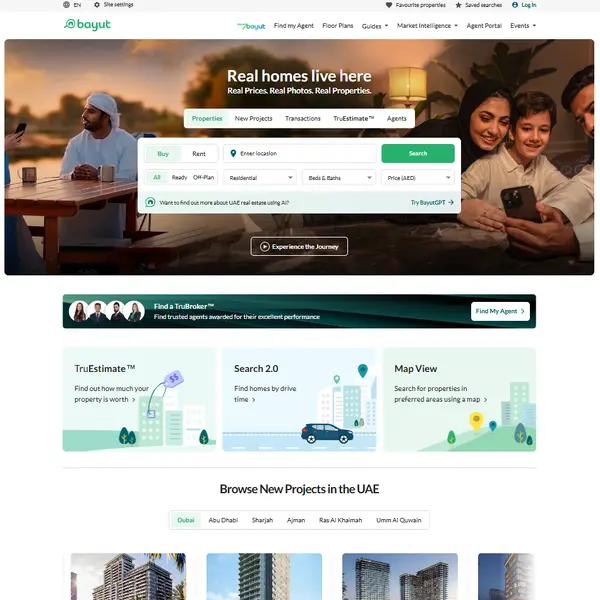
                <p class="subtitle">Access comprehensive real estate listings from Bayut.com - from spacious Dubai villas to downtown apartments. ScrapeIt delivers the property data you need - including prices, location, property details, and agent information - all cleaned and tailored for export.
</p>
                <div style="display: flex;">
                <div class="buttons">
                    <a href="#pricing" data-w-id="df08596e-c911-6bec-12d5-12aa462d9348" class="primary-button no_anim w-button"><strong>See Our Plans</strong></a>
                    <a href="/cart?target=bayut.com" rel="nofollow" style="margin-left:10px;" class="primary-small-button white w-button">Get a Bayut data sample - &euro;9.99</a>
                </div>
                </div>
            </div>
            <div  id="w-node-df08596e-c911-6bec-12d5-12aa462d934a-3fedec56" data-w-id="df08596e-c911-6bec-12d5-12aa462d934a" class="main-image no_anim">
                <img src="/assets/cache_image/assets/img/real-estate/bayut-scraper-1_0x600_afd.webp" width="651" height="600" fetchpriority="high" alt="Bayut Scraper" class="image-34">
            </div>
        </div>
    </div>
</div>

<div id="solutions" class="section-2 grey_grad wf-section">
    <div class="container">
        <div class="title-container">
            <div class="text-block-9">Solutions</div>
            <h2 class="h2">How We Deliver Housing Data from Bayut</h2>
            <p><p>You don’t need to figure out how Bayut structures its listings - we handle that for you. With ScrapeIt, you can scrape Bayut data effortlessly using a custom extraction flow tailored to your goals - whether you're tracking luxury sales, rental trends, or developer listings across the UAE. We capture only the fields you care about and send them to you already parsed, formatted, and filtered - so you can skip the busywork and go straight to insights.</p>
</p>
        </div>

        <div class="two-col-grid m30">
  <div class="small-container">
    <h2 class="h2">What We Extract from Bayut</h2>
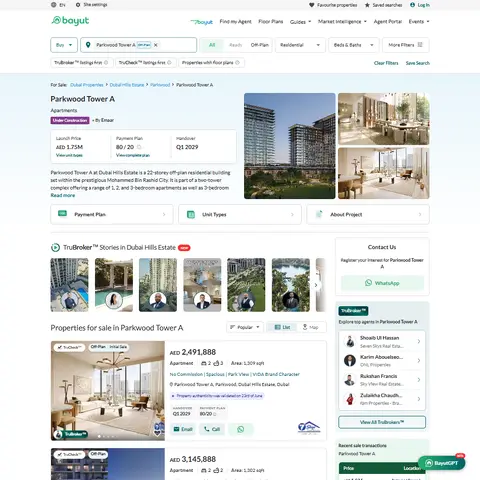
    <p><p>Bayut listings offer more than just headlines - and we make sure every detail is captured. From each property, we extract titles, full descriptions, AED pricing, number of bedrooms and bathrooms, square footage, furnishing status, and agent or company details. When available, we also collect verified badges, floor plans, payment breakdowns, and location pins. Whether you're focused on rental properties, luxury sales, or commercial listings, we extract the exact data fields that matter to your real estate strategy.</p>
</p>
  </div>
  
  <div class="small-container lastorder">
    <img src="/assets/cache_image/assets/img/real-estate/bayut-scraper-2_480x480_072.webp" width="480" loading="lazy" alt="What We Extract from Bayut">
  </div>
  
</div>

<div class="two-col-grid m30">
  
  <div class="small-container lastorder">
    <img src="/assets/cache_image/assets/img/real-estate/bayut-scraper-3_480x480_072.webp" width="480" loading="lazy" alt="More Than Listings - What Our Bayut Scraper Captures Beyond the Basics">
  </div>
  
  <div class="small-container">
    <h2 class="h2">More Than Listings - What Our Bayut Scraper Captures Beyond the Basics</h2>
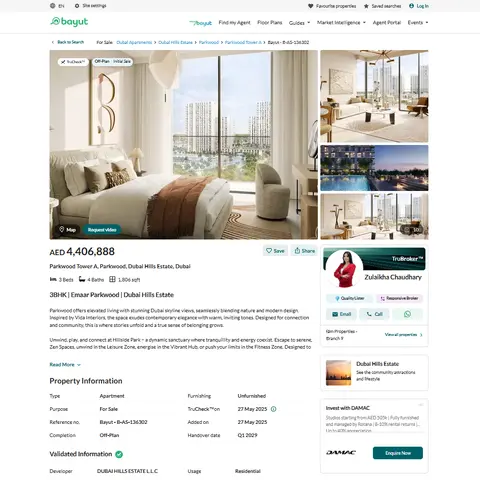
    <p><p>Bayut is more than a listing portal - it’s a rich source of property intelligence. With our Bayut scraper, we go far beyond basic exports to extract deeper insights: listing age, featured ad placements, agent activity levels, price change history, and engagement metrics like “views per day” or “user saves.” We can also capture location-based filters, project names, developer reputations, and tags such as “hot deal” or “urgent.” These extra layers help you track market momentum, analyze seller behavior, and identify high-interest listings with precision.</p>
</p>
  </div>
</div>
    </div>
</div>

<div id="about_platform" class="section-2 grey _60 wf-section">
  <div class="container">
    <div class="title-container left-align">
      <h2 class="h2">About Bayut</h2>
      <p><p>Bayut.com is the UAE’s premier real estate platform, active since 2008 and built to serve both English- and Arabic-speaking users. Listings span all seven emirates, with properties priced in AED and covering residential, commercial, and off-plan developments. Through bayut.com, users can explore everything from multi-unit projects to fractional ownership listings, which are gaining popularity in Dubai’s evolving market.</p>

<p>What sets Bayut apart is its PropTech depth. The platform offers map-based search, 3D virtual tours, interactive floor plans, and real-time pricing analytics like price-per-square-foot comparisons. Features such as TruCheck™ verified listings, agent and broker reviews, and developer trust badges help users evaluate listings with greater confidence.</p>

<p>Bayut doesn’t just serve end-users - it’s also a go-to resource for banks, developers, and policy makers, thanks to its regularly published market insights, which detail trends in neighborhood pricing, transaction volumes, and developer activity.</p>

<p>For real estate professionals, Bayut supports CRM integrations via API, automating data syncing for agencies and partners. Altogether, it functions as a secure, analytics-driven backbone for the UAE’s real estate ecosystem - not just a listings portal, but a full-scale infrastructure layer for housing intelligence.</p>
</p>
      <a href="#pricing" class="primary-small-button white w-button">Get a Quote</a>
    </div>
  </div>
</div>


<div class="section dark statistics wf-section">
    <div class="container">
      <div class="analytics-grid">
        <div class="analytic">
          <div class="feature-icon stat"><img src="/assets/images/dev_w.svg" loading="lazy" alt="dev_w"></div>
          <div data-w-id="0b7faf6a-17b4-2ec9-08fb-3f7e0600d8b4" class="h3-2 count">25</div>
          <p class="paragraph">Developers</p>
        </div>
        <div class="analytic">
          <div class="feature-icon stat"><img src="/assets/images/customers.svg" loading="lazy" alt="customers"></div>
          <div class="h3-2 count">500+</div>
          <p class="paragraph-2">Customers worldwide</p>
        </div>
        <div class="analytic">
          <div class="feature-icon stat"><img src="/assets/images/pages.svg" loading="lazy" alt="pages"></div>
          <div class="h3-2 count">1 500 000 000+</div>
          <p class="paragraph-3">Pages extracted</p>
        </div>
        <div class="analytic">
          <div class="feature-icon stat"><img src="/assets/images/stime.svg" loading="lazy" alt="stime"></div>
          <div class="h3-2 count">15000+</div>
          <p class="paragraph-4">Hours saved for our clients</p>
        </div>
      </div>
    </div>
  </div>
<script>
document.addEventListener('DOMContentLoaded', function () {
  const form = document.getElementById('email-form');
  const input = document.querySelector('input[name="plan"]');

  document.addEventListener('click', function (e) {
    const btn = e.target.closest('#pricing .btn[data-plan]');
    if (!btn) return;

    e.preventDefault();
    const plan = btn.getAttribute('data-plan') || '';
    if (input) input.value = plan;

    if (form) {
      form.scrollIntoView({ behavior: 'smooth', block: 'start' });
      history.replaceState(null, '', '#email-form');
    }
  });
});
</script>

<section id="pricing" class="pricing" aria-labelledby="pricing-title">

  <div class="pricing__container">


<span class="pricing__eyebrow">Plans</span>
<h2 class="pricing__title" id="pricing-title"></h2>


    <div class="pricing__grid">
      <!-- Airplane -->
      <article class="pricing-card" aria-label="Airplane plan">
        <div class="card__head">
          <h3 class="card__name">Airplane</h3>
          <p class="card__price">€199 <small>/ one-time</small></p>
          <p class="card__setup">setup fee - included</p>
        </div>
        <div class="card__body">
          <div class="feat"><span class="feat__name">Data limits</span><span class="feat__value">100,000</span></div>
          <div class="feat"><span class="feat__name">Frequency</span><span class="feat__value">one-time</span></div>
          <div class="feat"><span class="feat__name">Run time</span><span class="feat__value">up&nbsp;to&nbsp;5&nbsp;days</span></div>
          <div class="feat"><span class="feat__name">Data storing</span><span class="feat__value">7 days</span></div>
        </div>
        <div class="card__foot"><a aria-label="Choose the Airplane plan" class="btn" href="#email-form" data-plan="Airplane">Choose</a></div>
      </article>

      <!-- Helicopter -->
      <article class="pricing-card" aria-label="Helicopter plan">
        <div class="card__head">
          <h3 class="card__name">Helicopter</h3>
          <p class="card__price">€169 <small>/ mo</small></p>
          <p class="card__setup">setup fee €499</p>
        </div>
        <div class="card__body">
          <div class="feat"><span class="feat__name">Data limits</span><span class="feat__value">250,000</span></div>
          <div class="feat"><span class="feat__name">Frequency</span><span class="feat__value">monthly</span></div>
          <div class="feat"><span class="feat__name">Run time</span><span class="feat__value">up&nbsp;to&nbsp;5&nbsp;days</span></div>
          <div class="feat"><span class="feat__name">Data storing</span><span class="feat__value">14 days</span></div>
        </div>
        <div class="card__foot"><a aria-label="Choose the Helicopter plan" class="btn" href="#email-form" data-plan="Helicopter">Choose</a></div>
      </article>

      <!-- Glasses -->
      <article class="pricing-card" aria-label="Glasses plan">
        <div class="card__head">
          <h3 class="card__name">Glasses</h3>
          <p class="card__price">€229 <small>/ mo</small></p>
          <p class="card__setup">setup fee €499</p>
        </div>
        <div class="card__body">
          <div class="feat"><span class="feat__name">Data limits</span><span class="feat__value">1,000,000</span></div>
          <div class="feat"><span class="feat__name">Frequency</span><span class="feat__value">weekly</span></div>
          <div class="feat"><span class="feat__name">Run time</span><span class="feat__value">up&nbsp;to&nbsp;5&nbsp;days</span></div>
          <div class="feat"><span class="feat__name">Data storing</span><span class="feat__value">30 days</span></div>
        </div>
        <div class="card__foot"><a aria-label="Choose the Glasses plan" class="btn" href="#email-form" data-plan="Glasses">Choose</a></div>
      </article>

      <!-- Microscope (Popular) -->
      <article class="pricing-card pricing-card--popular" aria-label="Microscope plan" aria-current="true">
        <div class="card__head">
          <span class="card__popular">POPULAR</span>
          <h3 class="card__name">Microscope</h3>
          <p class="card__price">€349 <small>/ mo</small></p>
          <p class="card__setup">setup fee €499</p>
        </div>
        <div class="card__body">
          <div class="feat"><span class="feat__name">Data limits</span><span class="feat__value">2,000,000</span></div>
          <div class="feat"><span class="feat__name">Frequency</span><span class="feat__value">daily</span></div>
          <div class="feat"><span class="feat__name">Run time</span><span class="feat__value">same day</span></div>
          <div class="feat"><span class="feat__name">Data storing</span><span class="feat__value">60 days</span></div>
        </div>
        <div class="card__foot"><a aria-label="Choose the Microscope plan" class="btn btn--primary" href="#email-form" data-plan="Microscope">Choose</a></div>
      </article>

      <!-- DNA -->
      <article class="pricing-card" aria-label="DNA plan">
        <div class="card__head">
          <h3 class="card__name">DNA</h3>
          <p class="card__price">€549 <small>/ mo</small></p>
          <p class="card__setup">setup fee €799</p>
        </div>
        <div class="card__body">
          <div class="feat"><span class="feat__name">Data limits</span><span class="feat__value">3,000,000</span></div>
          <div class="feat"><span class="feat__name">Frequency</span><span class="feat__value">3&nbsp;times&nbsp;daily</span></div>
          <div class="feat"><span class="feat__name">Run time</span><span class="feat__value">same day</span></div>
          <div class="feat"><span class="feat__name">Data storing</span><span class="feat__value">90 days</span></div>
        </div>
        <div class="card__foot"><a aria-label="Choose the DNA plan" class="btn" href="#email-form" data-plan="DNA">Choose</a></div>
      </article>
    </div>

    <div class="pricing__more">
      <a href="/web-scraping-price" class="pricing__link">Full plan details →</a>
    </div>
  </div>
</section>

<div id="why_scrape" class="section-2 grey _60 wf-section">
  <div class="container">
    <div class="title-container left-align">
      <h3 class="h3">Why Use a Bayut Scraper?</h3>
      <p><p>Bayut offers rich, structured property content - but it’s designed for browsing, not bulk access. A Bayut scraper lets you bypass time-consuming filters and collect data across thousands of listings, categories, and agents. Whether you’re comparing prices in Business Bay, tracking off-plan launches, or analyzing leasing trends by developer, our solution gives you full control. You get clean, filtered property data - already tailored to your needs - so you can analyze faster, publish quicker, and build without limits.</p>
</p>
    </div>
  </div>
</div>

<div id="related_platforms" class="section-2 grey_grad wf-section">
  <div class="container">
    <div class="title-container left-align">
      <h2 class="h2">Other Real Estate sites we scrape</h2>
      <p>Same pipeline, same delivery formats. Pick a platform to see its fields, limits and turnaround.</p>
    </div>
    <ul class="related-platforms">
      <li class="related-platforms__item"><a class="related-platforms__link" href="/real-estate-scrapers/dubizzle"><span class="related-platforms__name">Dubizzle scraper</span><span class="related-platforms__meta">United Arab Emirates</span></a></li>
      <li class="related-platforms__item"><a class="related-platforms__link" href="/real-estate-scrapers/property24"><span class="related-platforms__name">Property24 scraper</span><span class="related-platforms__meta">South Africa</span></a></li>
      <li class="related-platforms__item"><a class="related-platforms__link" href="/real-estate-scrapers/sahibinden"><span class="related-platforms__name">Sahibinden scraper</span><span class="related-platforms__meta">Turkey</span></a></li>
      <li class="related-platforms__item"><a class="related-platforms__link" href="/real-estate-scrapers/bazos"><span class="related-platforms__name">Bazos scraper</span><span class="related-platforms__meta">Czech Republic</span></a></li>
      <li class="related-platforms__item"><a class="related-platforms__link" href="/real-estate-scrapers/boligsiden"><span class="related-platforms__name">Boligsiden scraper</span><span class="related-platforms__meta">Denmark</span></a></li>
      <li class="related-platforms__item"><a class="related-platforms__link" href="/real-estate-scrapers/booli"><span class="related-platforms__name">Booli scraper</span><span class="related-platforms__meta">Sweden</span></a></li>
      <li class="related-platforms__item"><a class="related-platforms__link" href="/real-estate-scrapers/crexi"><span class="related-platforms__name">CREXi scraper</span><span class="related-platforms__meta">United States</span></a></li>
      <li class="related-platforms__item"><a class="related-platforms__link" href="/real-estate-scrapers/domain-com-au"><span class="related-platforms__name">Domain.com.au scraper</span><span class="related-platforms__meta">Australia</span></a></li>
    </ul>
    <p class="related-platforms__more"><a href="/popular-sites/real-estate">See all 94 real estate portals we scrape</a></p>
  </div>
</div>
<style>
.related-platforms{display:grid;grid-template-columns:repeat(auto-fill,minmax(220px,1fr));
  gap:12px;list-style:none;margin:24px 0 0;padding:0}
.related-platforms__item{margin:0}
.related-platforms__link{display:block;height:100%;padding:14px 16px;border:1px solid #e5e7eb;
  border-radius:10px;background:#fff;text-decoration:none;transition:border-color .15s,box-shadow .15s}
.related-platforms__link:hover,.related-platforms__link:focus{border-color:#4e74ff;
  box-shadow:0 4px 14px rgba(78,116,255,.14);text-decoration:none}
.related-platforms__name{display:block;color:#1f2937;font-size:16px;font-weight:600;line-height:1.35}
.related-platforms__meta{display:block;margin-top:4px;color:#6b7280;font-size:13px;line-height:1.3}
.related-platforms__more{margin:20px 0 0}
.related-platforms__more a{color:#3552c9;font-weight:600}
@media(max-width:575px){.related-platforms{grid-template-columns:1fr}}
</style>

<section class="section-2 wf-section" id="cases">
  <div class="container">
    <div class="title-container left-align"><h2 class="h2">Related Case Studies</h2></div>
    <div class="posts-grid" role="list" aria-label="Related Case Studies">
  
  
    <div id="w-node-_3e2a777f-c626-8c48-a040-431e109bc5f0-b6ce6576" role="listitem" class="collection-item w-dyn-item">
        <div class="post-card">
            <a href="/case-studies/230000-daily-rows-standardized-across-5-eu-property-sites" class="w-inline-block">
                <img loading="lazy" width="380" height="230" src="/assets/cache_image/assets/img/cases/5-companies_380x230_c65.webp" class="post-image" alt="230,000 Daily Rows Standardized Across 5 EU Property Sites" />
            </a>
        <div class="post-content">
            <a href="/case-studies/230000-daily-rows-standardized-across-5-eu-property-sites" class="link-block w-inline-block h3-5"><h2 class="h3-5 not-margin">230,000 Daily Rows Standardized Across 5 EU Property Sites</h2></a>
        <p class="small-text small-height">Monitoring of real estate listings on funda.nl, pararius.com, rentberry.com, rentola.com, and zimmo.be to support the growth of a European property portal.</p>
<a href="/case-studies/230000-daily-rows-standardized-across-5-eu-property-sites" class="link">
  Learn More<span style="position:absolute;width:1px;height:1px;padding:0;margin:-1px;overflow:hidden;clip:rect(0,0,0,0);white-space:nowrap;border:0;"> about 230,000 Daily Rows Standardized Across 5 EU Property Sites</span>
</a>
        </div>
        </div>
        </div>
  
  
    <div id="w-node-_3e2a777f-c626-8c48-a040-431e109bc5f0-b6ce6576" role="listitem" class="collection-item w-dyn-item">
        <div class="post-card">
            <a href="/case-studies/85k-rows-of-houses-day-into-crm-via-api-set-up-in-7-days" class="w-inline-block">
                <img loading="lazy" width="380" height="230" src="/assets/cache_image/assets/img/cases/2-sites_380x230_c65.webp" class="post-image" alt="85K Rows of Houses/Day Into CRM via API - Set up in 7 Days" />
            </a>
        <div class="post-content">
            <a href="/case-studies/85k-rows-of-houses-day-into-crm-via-api-set-up-in-7-days" class="link-block w-inline-block h3-5"><h2 class="h3-5 not-margin">85K Rows of Houses/Day Into CRM via API - Set up in 7 Days</h2></a>
        <p class="small-text small-height">Daily detection of new private property listings in Switzerland on Homegate.ch and ImmoScout24.ch, giving the agency first access to high-value leads.</p>
<a href="/case-studies/85k-rows-of-houses-day-into-crm-via-api-set-up-in-7-days" class="link">
  Learn More<span style="position:absolute;width:1px;height:1px;padding:0;margin:-1px;overflow:hidden;clip:rect(0,0,0,0);white-space:nowrap;border:0;"> about 85K Rows of Houses/Day Into CRM via API - Set up in 7 Days</span>
</a>
        </div>
        </div>
        </div>
  
  
    <div id="w-node-_3e2a777f-c626-8c48-a040-431e109bc5f0-b6ce6576" role="listitem" class="collection-item w-dyn-item">
        <div class="post-card">
            <a href="/case-studies/226k-listings-3-4m-images-from-immobilienscout24" class="w-inline-block">
                <img loading="lazy" width="380" height="230" src="/assets/cache_image/assets/img/cases/immoscout24_380x230_c65.webp" class="post-image" alt="226K Listings + 3.4m Images from Immobilienscout24" />
            </a>
        <div class="post-content">
            <a href="/case-studies/226k-listings-3-4m-images-from-immobilienscout24" class="link-block w-inline-block h3-5"><h2 class="h3-5 not-margin">226K Listings + 3.4m Images from Immobilienscout24</h2></a>
        <p class="small-text small-height">Scraping residential listings from Immobilienscout24.de in Germany and Mallorca, including complete data and resized images.</p>
<a href="/case-studies/226k-listings-3-4m-images-from-immobilienscout24" class="link">
  Learn More<span style="position:absolute;width:1px;height:1px;padding:0;margin:-1px;overflow:hidden;clip:rect(0,0,0,0);white-space:nowrap;border:0;"> about 226K Listings + 3.4m Images from Immobilienscout24</span>
</a>
        </div>
        </div>
        </div>
    </div>
    <div class="cases__more"><a href="/case-studies/" class="primary-button w-button">All Case Studies</a></div>
  </div>
</section>

  <div id="blog" class="section-2 grey_grad anim wf-section">
    <div class="container">
      <div class="title-container">
        <div class="text-block-9">Our Blog</div>
        <h2 class="h2">Reads Our Latest News &amp; Blog<br></h2>
        <p>Learn how to use web scraping to solve data problems for your organization<br></p>
      </div>
      <div class="medium-container center">
        <div class="w-dyn-list">
          <div role="list" class="collection-list w-dyn-items w-row">
            
<div role="listitem" class="blog_anounce anounce w-dyn-item w-col w-col-4">
    <div class="post-card"><a href="/blog/scraping-property-portals-by-region"
            class="w-inline-block"><img loading="lazy" width="380" height="230" src="/assets/cache_image/assets/images/blog/Scraping%20Property%20Portals%20by%20Region_%20Best%20Real%20Estate%20Platforms%20That%20Actually%20Matter_380x230_661.webp" alt="Scraping Property Portals by Region: Best Real Estate Platforms That Actually Matter" class="post-image"></a>
        <div class="post-content main_page"><a href="/blog/scraping-property-portals-by-region"
                class="link-block w-inline-block">
                <h3 class="h3-5 not-margin">Scraping Property Portals by Region: Best Real Estate Platforms That Actually Matter</h3>
            </a>
            <div class="small-text"></div>
            <p class="small-text small-height">Real estate teams work in a fragmented data landscape. The sites that drive demand in Boston look nothing like the ones that matter in Berlin, São Paulo, Dubai, or Mumbai.</p>
        </div>
    </div>
</div>
<div role="listitem" class="blog_anounce anounce w-dyn-item w-col w-col-4">
    <div class="post-card"><a href="/blog/7-real-estate-websites-to-scrape-in-2026-plus-2-hidden-gems"
            class="w-inline-block"><img loading="lazy" width="380" height="230" src="/assets/cache_image/assets/images/blog/7%20Real%20Estate%20Websites%20to%20Scrape%20in%202026%20Year_380x230_661.webp" alt="7 Real Estate Websites to Scrape in 2026: Plus 2 Hidden Gems" class="post-image"></a>
        <div class="post-content main_page"><a href="/blog/7-real-estate-websites-to-scrape-in-2026-plus-2-hidden-gems"
                class="link-block w-inline-block">
                <h3 class="h3-5 not-margin">7 Real Estate Websites to Scrape in 2026: Plus 2 Hidden Gems</h3>
            </a>
            <div class="small-text"></div>
            <p class="small-text small-height">Real estate teams are operating in a data environment that is bigger, faster, and more fragmented than ever. Listings go live and disappear in hours, price cuts happen quietly, and the portals that matter most in each country are rarely the same global “top 5.” </p>

        </div>
    </div>
</div>
<div role="listitem" class="blog_anounce anounce w-dyn-item w-col w-col-4">
    <div class="post-card"><a href="/blog/how-to-use-real-estate-web-scraping-to-gain-valuable-insights"
            class="w-inline-block"><img loading="lazy" width="380" height="230" src="/assets/cache_image/assets/images/blog/benefits-real-estate-min_380x230_661.webp" alt="How to Use Real Estate Web Scraping to Gain Valuable Insights" class="post-image"></a>
        <div class="post-content main_page"><a href="/blog/how-to-use-real-estate-web-scraping-to-gain-valuable-insights"
                class="link-block w-inline-block">
                <h3 class="h3-5 not-margin">How to Use Real Estate Web Scraping to Gain Valuable Insights</h3>
            </a>
            <div class="small-text">September  4, 1180</div>
            <p class="small-text small-height">Real estate web scraping: a powerful tool for data collection and analysis. Learn how to choose the right data collection method and benefit from real estate web scraping</p>
        </div>
    </div>
</div>

          </div>
        </div>
      </div>
    </div>
  </div>

<div id="about_scrapeit" class="section-2 grey _60 wf-section">
  <div class="container">
    <div class="two-col-grid m30">
      <div class="small-container lastorder">
        <img src="/assets/images/scrateit-logo1.svg" width="135" height="44" loading="lazy" alt="scrapeit logo" class="logo-icon">
      </div>
      <div class="small-container">
        <h3 class="h2">About ScrapeIt</h3>
        <p><p>At ScrapeIt, we focus on one thing: getting you the exact real estate data you need - already collected, organized, and export-ready. You don’t have to set up anything. We build the scraper, run it, and scrape Bayut data based on your goals, then deliver it in your preferred format - whether it's for housing research, pricing models, or internal dashboards. No apps, no APIs - just results.</p>
</p>
      </div>
    </div>
  </div>
</div>


<div id="faq" class="section-2 grey_grad wf-section">
  <div class="container">
    <div class="medium-container">
      <div class="title-container">
        <h2 class="h2">FAQ</h2>
      </div>
      <div class="faq-blocks">
        
        <details class="faq-item" name="faq">
  <summary class="faq-q"><h3 class="h4">What formats can I receive the data in?</h3></summary>
  <div class="faq-a"><p>We deliver housing data from Bayut in CSV, Excel, or JSON - depending on how you plan to use it.
</p></div>
</details>

        
        <details class="faq-item" name="faq">
  <summary class="faq-q"><h3 class="h4">Can I get only listings for a specific emirate or city?</h3></summary>
  <div class="faq-a"><p>Yes. We can filter by location, such as Dubai, Abu Dhabi, Sharjah, or any region available on Bayut.
</p></div>
</details>

        
        <details class="faq-item" name="faq">
  <summary class="faq-q"><h3 class="h4">Is it possible to include agent contact details and verification status?</h3></summary>
  <div class="faq-a"><p>Absolutely. If those fields are available, we include agent names, badges, and contact methods.</p></div>
</details>

        
        <details class="faq-item" name="faq">
  <summary class="faq-q"><h3 class="h4">How often can new data be collected?</h3></summary>
  <div class="faq-a"><p>You can choose one-time delivery, weekly updates, or a custom schedule - depending on how often listings change in your target area.
</p></div>
</details>

        
        <details class="faq-item" name="faq">
  <summary class="faq-q"><h3 class="h4">Do I need to configure or install anything to start?</h3></summary>
  <div class="faq-a"><p>No setup needed. We manage the extraction and send you the final data package - fully cleaned and ready for use.
</p></div>
</details>
      </div>
    </div>
  </div>
</div>

  <div id="contact_us" class="section-2 wf-section">
    <div class="container">
      <div class="two-col-grid">
        <div id="w-node-_6bdf86f3-629e-5109-6735-d79b5709c615-5709c612" class="small-container-2">
          <h2 id="w-node-_6bdf86f3-629e-5109-6735-d79b5709c616-5709c612" class="h2">How does it Work?</h2>
          <div class="small-feature margin-top">
            <p><strong>Step 1 - Make a Request</strong></p>
            <p>You share your needs, expectations, and desired timeframe. We’ll suggest the best solution based on your request and budget.</p>
          </div>
          <div class="small-feature">
            <p><strong>Step 2 - Configuring Custom Web Crawlers</strong></p>
            <p class="paragraph-18">Our specialists configure the crawlers and extract a sample dataset for your review before proceeding with the full-scale extraction.</p>
          </div>
          <div class="small-feature">
            <p><strong>Step 3 - Collect and Deliver</strong></p>
            <p class="paragraph-18">Once you approve the sample, we launch the project and start full data collection. We gather, filter, and structure the data for easy use, delivering it on time in your preferred format.</p>
          </div>
          <div class="small-feature">
            <p><strong>Step 4 - Maintain and Support</strong></p>
            <p class="paragraph-18">Our team manages ongoing processes, monitors website changes, and supports all data extraction cycles. We can also help integrate data into your systems or create dashboards to simplify analysis.</p>
          </div>
        </div>
        <div data-w-id="6bdf86f3-629e-5109-6735-d79b5709c634" class="contact-container">
          <h2 class="h2">Request a Quote<br></h2>
          <div>Tell us more about you and your project information.<br></div>
          <div class="form-block wm-form">

     	
 <form id="email-form" method="post" class="ajax_form form" data-formit-ajax-token="dc76af276df19e50e1362a6b895974b6">

    <input type="hidden" name="nospam" value="" />
    <input type="hidden" name="work-email" value="" />
    <input type="hidden" name="pagetitle" value="Bayut">
    <input type="hidden" name="discount" id="discount" value="">
    <input type="hidden" name="urladress" value="https://www.scrapeit.io/real-estate-scrapers/bayut">

  <div class="field">
    <label for="name-2">Your name <span class="field-req" aria-hidden="true">*</span></label>
    <input
      type="text"
      name="name"
      id="name-2"
      class="text-field contact w-input"
      maxlength="256"
      autocomplete="name"
      enterkeyhint="next"
      required
      aria-describedby="name-err"
      value="">
    <span class="field-error" id="name-err" data-formit-error="name"></span>
  </div>

  <div class="field">
    <label for="Email-2">Work email <span class="field-req" aria-hidden="true">*</span></label>
    <input
      type="email"
      name="email"
      id="Email-2"
      class="text-field contact w-input"
      maxlength="256"
      autocomplete="email"
      inputmode="email"
      spellcheck="false"
      enterkeyhint="next"
      required
      aria-describedby="email-err"
      value="">
    <span class="field-error error_name" id="email-err" data-formit-error="email"></span>
  </div>

  <div class="field field--wide">
    <label for="Message-2">What data can we scrape for you? <span class="field-req" aria-hidden="true">*</span></label>
    <textarea
      name="message"
      id="Message-2"
      class="textarea w-input"
      maxlength="5000"
      required
      aria-describedby="message-hint message-err"></textarea>
    <span class="field-hint" id="message-hint">Which sites, which fields, how often. A couple of lines is enough.</span>
    <span class="field-error" id="message-err" data-formit-error="message"></span>
  </div>

  <div class="field field--wide">
    <label for="resource">Site you want scraped <span class="field-opt">optional</span></label>
    <input
      type="text"
      name="resource"
      id="resource"
      class="text-field contact w-input"
      maxlength="256"
      autocomplete="url"
      inputmode="url"
      spellcheck="false"
      value="">
  </div>

  <div class="field field--wide">
    <label for="chosen-plan">Chosen plan <span class="field-opt">optional</span></label>
    <input
      type="text"
      name="plan"
      id="chosen-plan"
      class="text-field contact w-input"
      maxlength="256"
      autocomplete="off"
      value="">
  </div>

  <div class="recaptcha-item field--wide">
    <div class="g-recaptcha" data-sitekey="6Lfcb8EgAAAAAHBW0oGPPwnW5XF6S1C9uQ_plwSP"></div>
<script>
/* Скрипт reCAPTCHA весит ~940 КБ и грузился на каждой странице сразу.
   Подключаем его при приближении к форме или при первом касании. */
(function () {
  var loaded = false;
  function load() {
    if (loaded) return;
    loaded = true;
    var s = document.createElement('script');
    s.src = 'https://www.google.com/recaptcha/api.js?hl=en';
    s.async = true;
    s.defer = true;
    document.head.appendChild(s);
  }
  function bind() {
    var box  = document.querySelector('.g-recaptcha');
    var form = box && box.closest ? box.closest('form') : null;
    var t    = form || document;
    ['focusin', 'pointerdown', 'touchstart', 'keydown'].forEach(function (ev) {
      t.addEventListener(ev, load, { once: true, passive: true });
    });
    if (box && 'IntersectionObserver' in window) {
      var io = new IntersectionObserver(function (en) {
        for (var i = 0; i < en.length; i++) { if (en[i].isIntersecting) { load(); io.disconnect(); return; } }
      }, { rootMargin: '500px' });
      io.observe(box);
    } else {
      load();
    }
  }
  if (document.readyState === 'loading') document.addEventListener('DOMContentLoaded', bind);
  else bind();
  /* Запасной запуск. Раньше тут стоял requestIdleCallback: на живой странице он
     ждёт простоя, но в синтетическом замере простой наступает сразу после
     загрузки, и виджет затягивал ~420 КБ (скрипт, стили, iframe и шрифт Roboto)
     прямо в холодную загрузку. Именно это держало мобильный FCP около 3 секунд.
     Живой посетитель всегда что-то делает: скроллит, ведёт мышью, жмёт клавишу.
     Ждём первого такого события; таймер оставлен дальним страховым пределом,
     чтобы виджет заведомо существовал к моменту отправки формы. Основные
     триггеры выше (IntersectionObserver на 500px и события самой формы)
     не тронуты - они и раньше срабатывали задолго до нажатия Submit. */
  ['scroll', 'pointerdown', 'keydown', 'touchstart', 'mousemove'].forEach(function (ev) {
    window.addEventListener(ev, load, { once: true, passive: true });
  });
  setTimeout(load, 10000);
})();
</script>
      
  </div>

  <div class="field--wide form-actions">
    <input type="submit" name="email-form" value="Submit" class="submit-button w-button">
    <p class="form-reassure">We reply within 1 business day. No obligation.</p>
  </div>

  <div class="success-message formit-msg field--wide" role="status" aria-live="polite" data-formit-success-message></div>
<div class="error-message formit-msg field--wide" role="alert" aria-live="assertive" data-formit-validation-error-message></div>
<div class="error-message formit-msg field--wide" role="alert" aria-live="assertive" data-formit-error-message></div>
</form>
  
          </div>
        </div>
      </div>
    </div>
  </div>
</main>
<style>
/* Ссылки футера: разделитель между пунктами и аккуратный перенос.
   Десять ссылок в одну строку при 1440 не помещаются, и без разделителя
   перенесённый хвост читался как случайный. */
.footer-links{display:flex;flex-wrap:wrap;align-items:center;column-gap:.8rem;row-gap:.35rem}
.footer-links .text-block-8{display:flex;align-items:center;white-space:nowrap}
.footer-links .text-block-8:not(:last-child)::after{content:"|";margin-left:.8rem;color:#b9c2d8;font-weight:400;line-height:1}
.footer-legal{display:flex;flex-wrap:wrap;align-items:center;column-gap:.8rem;row-gap:.35rem}
.footer-legal a:not(:last-child)::after{content:"|";margin-left:.8rem;color:#b9c2d8;font-weight:400}
.div-block-27{display:flex;flex-wrap:wrap;align-items:center;column-gap:1.2rem;row-gap:.35rem}
@media (max-width:600px){
  .footer-links{column-gap:.6rem}
  .footer-links .text-block-8:not(:last-child)::after{margin-left:.6rem}
}
</style>
<div id="adress" class="section dark down wf-section">

  <div class="container div-block-11">
    <div class="div-block-14"><img src="/assets/images/logo-scrateit-w2.svg" loading="lazy" width="187" height="56" alt="scrapiet" class="image-32"></div>
    <div class="div-block-13">
      <p class="paragraph-24">Scrapeit Sp. z o.o.<br>10/208 Legionowa str., 15-099, Bialystok, Poland<br>NIP: 5423457175<br>REGON: 523384582</p>
    </div>
    <div class="div-block-12">
      <div class="small-feature-2 contacts"><img src="/assets/images/check_icon.svg" alt="check_icon" loading="lazy" width="20" height="26" class="check-icon-v-2">
        <p class="paragraph-25"><a href="tel:+48537997956" class="link-5">+ 48 537 99-79-56</a><br></p>
      </div>
      <div class="small-feature-2 contacts"><img src="/assets/images/check_icon.svg" alt="check_icon" loading="lazy" width="20" height="26" class="check-icon-v-2">
        <p class="paragraph-25"><a href="mailto:info@scrapeit.io" class="link-5">info@scrapeit.io</a><br></p>
      </div>
    </div>
  </div>
</div>
<div class="footer wf-section">
  <div class="footer-bottom">
    <div class="w-layout-grid grid-5">
      <!-- Одна группа ссылок, одной строкой. Замерено при 1440: девять ссылок
           занимают 990px при кегле 14px в контейнере 1170px, то есть влезают
           при зазоре до 20px. Раньше групп было две, каждая занимала всю
           ширину, отсюда и две строки. -->
      <div class="div-block-10 footer-links">
        <div class="text-block-8"><a href="/web-scraping-cost" class="link-4">Scraping cost</a></div>
        <div class="text-block-8"><a href="/build-vs-buy-web-scraper" class="link-4">Build or hire</a></div>
        <div class="text-block-8"><a href="/scraper-keeps-getting-blocked" class="link-4">Getting blocked</a></div>
        <div class="text-block-8"><a href="/web-scraping-maintenance" class="link-4">Maintenance</a></div>
        <div class="text-block-8"><a href="/compliance" class="link-4">Compliance</a></div>
        <div class="text-block-8"><a href="/vs/" class="link-4">Compare vendors</a></div>
        <div class="text-block-8"><a href="/about-us" class="link-4">About Us</a></div>
        <div class="text-block-8"><a href="/contact-us" class="link-4">Contact Us</a></div>
      </div>
      <div class="div-block-27">
        <div>&copy; 2026 ScrapeIt. All rights reserved.</div>
        <div class="footer-legal">
          <a href="/privacy-policy" class="link-4">Privacy &amp; Cookies</a>
          <a href="/terms-of-use.pdf" class="link-4">Terms of Use</a>
        </div>
      </div>
      <!-- Значки отдельным блоком: внутри группы ссылок они участвовали в
           переносе вместе с ними и вставали где придётся. -->
      <div class="footer-marks">
        <a href="https://www.linkedin.com/company/scrapeitio/" target="_blank" rel="noopener noreferrer" class="link-block-4 w-inline-block"><img src="/assets/images/linkedin.svg" width="24" height="24" loading="lazy" alt="linkedin" class="image-42"></a>
        <a href="https://www.designrush.com/agency/market-research" rel="noopener noreferrer" target="_blank" class="link-block-4 second w-inline-block"><img src="/assets/images/design-rush.png" height="34" loading="lazy" alt="design rush" class="image-42" width="120"></a>
      </div>
    </div>
  </div>
</div>

<!-- Блок отложенной загрузки тяжелых скриптов (GTM, Tawk, Fingerprint, Turnstile) -->
<script>
  let heavyScriptsLoaded = false;
  function loadHeavyScripts() {
    if (!heavyScriptsLoaded) {
      heavyScriptsLoaded = true;

      (function(w, d, s, l, i) {
          w[l] = w[l] || [];
          w[l].push({'gtm.start': new Date().getTime(), event: 'gtm.js'});
          var f = d.getElementsByTagName(s)[0],
              j = d.createElement(s),
              dl = l != 'dataLayer' ? '&l=' + l : '';
          j.async = true;
          j.src = 'https://www.googletagmanager.com/gtm.js?id=' + i + dl;
          f.parentNode.insertBefore(j, f);
      })(window, document, 'script', 'dataLayer', 'GTM-W7LWHG3');

      /* Штатный сниппет Tawk объявляет эти две переменные до загрузки
         скрипта. В нашей версии объявление было потеряно, из-за чего
         Tawk_API не существовал и к виджету нельзя было подцепить ни
         настройки, ни обработчики событий. */
      window.Tawk_API = window.Tawk_API || {};
      window.Tawk_LoadStart = new Date();

      var s1=document.createElement("script");
      s1.async=true;
      s1.src='https://embed.tawk.to/68d69f303625ad192744757b/1j635rm2e';
      s1.charset='UTF-8';
      /* Атрибут crossorigin из штатного сниппета Tawk убран намеренно.
         С ним браузер делает CORS-запрос, а на конечном адресе после
         редиректа заголовка Access-Control-Allow-Origin нет, и чат
         не загружался вообще. Обычному скрипту CORS не нужен. */
      document.body.appendChild(s1);
    }
  }

  ['scroll', 'mousemove', 'click', 'touchstart'].forEach(function(e) {
    window.addEventListener(e, loadHeavyScripts, { once: true, passive: true });
  });
  setTimeout(loadHeavyScripts, 7000);
</script>

<script>
/* Отправка событий в dataLayer для GTM и GA4.
 *
 * Зачем: на сайте стоял GTM, но не было ни одного события. Из-за этого
 * нельзя было отличить страницу, которая приносит заявки, от страницы с
 * трафиком без заявок, то есть весь SEO мерился вслепую.
 *
 * Формы работают на FormIt и сами рассылают события formit:success и
 * formit:error на элементе формы с bubbles: true. Поэтому вендорный
 * formit.js трогать не нужно - слушаем на уровне документа.
 *
 * Что уходит в dataLayer:
 *   form_start           - первое касание любой формы (один раз на форму)
 *   generate_lead        - форма успешно отправлена (штатное имя события GA4)
 *   form_error           - отправка не прошла, с текстом ошибки
 *   sample_cta_click     - клик по кнопке покупки образца данных
 *   sample_order_started - отправлена форма заказа образца, до перехода в Stripe
 *   file_download        - скачивание файла образца
 *   chat_open            - открыт чат
 *
 * В GTM на каждое имя нужен свой тег GA4. Ничего из этого не срабатывает
 * само по себе: без настройки тегов события просто лежат в dataLayer.
 */
(function () {
  'use strict';

  window.dataLayer = window.dataLayer || [];

  function push(name, params) {
    var payload = {
      event: name,
      page_path: location.pathname,
      page_title: document.title
    };
    if (params) {
      for (var k in params) {
        if (Object.prototype.hasOwnProperty.call(params, k) && params[k] !== '' && params[k] != null) {
          payload[k] = params[k];
        }
      }
    }
    window.dataLayer.push(payload);
  }

  /** Имя формы: сначала явное, потом id, потом первый класс. */
  function formName(form) {
    if (!form) { return 'unknown'; }
    return form.getAttribute('data-analytics-name') || form.id || form.className.split(' ')[0] || 'unknown';
  }

  /** Значение поля формы, если оно есть и не пустое. */
  function field(form, name) {
    var el = form ? form.querySelector('[name="' + name + '"]') : null;
    return el && el.value ? String(el.value).slice(0, 100) : '';
  }

  /* --- первое касание формы --- */
  document.addEventListener('focusin', function (e) {
    var form = e.target && e.target.form;
    if (!form || form.dataset.analyticsStarted) { return; }
    form.dataset.analyticsStarted = '1';
    push('form_start', { form_name: formName(form) });
  }, true);

  /* --- успешная отправка --- */
  document.addEventListener('formit:success', function (e) {
    var form = e.target;
    push('generate_lead', {
      form_name: formName(form),
      chosen_plan: field(form, 'plan'),
      requested_site: field(form, 'resource')
    });
  });

  /* --- отправка не прошла --- */
  document.addEventListener('formit:error', function (e) {
    var d = e.detail && e.detail.data;
    var ph = d && d.data ? d.data : {};
    push('form_error', {
      form_name: formName(e.target),
      error_text: String(ph.validation_error_message || ph.error_message || 'validation').slice(0, 120)
    });
  });

  document.addEventListener('DOMContentLoaded', function () {

    /* --- заказ образца данных: считаем до перехода в Stripe --- */
    var order = document.getElementById('data-sample-order');
    if (order) {
      order.addEventListener('submit', function () {
        var sel = order.querySelector('[name="target"]');
        var other = order.querySelector('[name="target_other"]');
        var target = sel ? sel.value : '';
        if ((!target || target === 'other') && other) { target = other.value; }
        push('sample_order_started', { target_site: String(target || '').slice(0, 100) });
      });
    }

    /* --- клики по ссылкам и файлам --- */
    document.addEventListener('click', function (e) {
      var a = e.target && e.target.closest ? e.target.closest('a[href]') : null;
      if (!a) { return; }
      var href = a.getAttribute('href') || '';

      if (/\/assets\/samples\//.test(href)) {
        var name = decodeURIComponent(href.split('/').pop() || '');
        push('file_download', {
          file_name: name,
          file_extension: (name.split('.').pop() || '').toLowerCase()
        });
        return;
      }

      // Кнопка покупки образца ведёт на страницу заказа, иногда с ?target=
      if (/(^|\/)cart(\/|\?|$)/.test(href)) {
        var m = href.match(/[?&]target=([^&]+)/);
        push('sample_cta_click', { target_site: m ? decodeURIComponent(m[1]) : '' });
      }
    }, true);

    /* --- приход на страницу заказа с кнопки площадки ---
       Клик по самой кнопке уводит на другую страницу, и событие может не
       успеть уехать. Поэтому надёжную точку воронки ставим на приходе:
       параметр target в адресе есть только тогда, когда пришли с кнопки. */
    var q = new URLSearchParams(location.search);
    if (q.get('target')) {
      push('sample_cta_landed', { target_site: q.get('target').slice(0, 100) });
    }

    /* --- чат --- */
    if (window.Tawk_API) {
      window.Tawk_API.onChatStarted = function () { push('chat_open', { chat: 'tawk' }); };
      window.Tawk_API.onChatMessageVisitor = function () { push('chat_message', { chat: 'tawk' }); };
    }
  });
})();
</script>


<!-- Базовые скрипты (jQuery оставляем синхронно внизу, Webflow и AjaxForm с defer/async) -->
<script src="/assets/js/jquery-3.5.1.min.js" type="text/javascript" integrity="sha256-9/aliU8dGd2tb6OSsuzixeV4y/faTqgFtohetphbbj0=" crossorigin="anonymous"></script>
<script defer src="/assets/js/webflow.js?v=1787220607" type="text/javascript"></script>
   <!-- jGrowl для AjaxForm -->

<div id="gtm-container"></div>

<!--  Google Tag Manager (noscript)  -->
<noscript><iframe src="https://www.googletagmanager.com/ns.html?id=GTM-W7LWHG3" height="0" width="0" style="display:none;visibility:hidden"></iframe></noscript>
<!--  End Google Tag Manager (noscript)  -->

<script type="application/ld+json">
{
  "@context": "https://schema.org",
  "@type": "Organization",
  "@id": "https://www.scrapeit.io/#organization",
  "name": "ScrapeIt",
  "alternateName": [
    "ScrapeIt.io",
    "ScrapeIt - Web Data Scraping",
    "Scrapeit Sp. z o.o."
  ],
  "legalName": "Scrapeit Sp. z o.o.",
  "url": "https://www.scrapeit.io/",
  "logo": "https://www.scrapeit.io/assets/images/scrateit-logo1.svg",
  "description": "ScrapeIt provides custom web data scraping services, delivering reliable, structured datasets tailored to your business needs.",
  "disambiguatingDescription": "ScrapeIt is a managed web scraping company registered in Bialystok, Poland as Scrapeit Sp. z o.o. and founded in 2021. It is a done-for-you data extraction service whose engineers build, host and maintain the scrapers for the customer. It is not a self-serve scraping tool or library, and it is a separate company from similarly named products such as Scrape.it, ScrapeIt Pro, Scrapy and ScraperAPI.",
  "foundingDate": "2021",
  "foundingLocation": {
    "@type": "Place",
    "address": {
      "@type": "PostalAddress",
      "addressLocality": "Bialystok",
      "addressCountry": "PL"
    }
  },
  "numberOfEmployees": {
    "@type": "QuantitativeValue",
    "minValue": 10,
    "maxValue": 49
  },
  "areaServed": "Worldwide",
  "vatID": "PL5423457175",
  "knowsAbout": [
    "Managed web scraping services",
    "Web data extraction",
    "Custom scraper development and maintenance",
    "E-commerce price and assortment monitoring",
    "Real estate listings data",
    "Job market data",
    "Financial and market data extraction",
    "Sales lead and business directory data",
    "Travel and hospitality rate data",
    "Automotive listings data",
    "Datasets for AI and machine learning training",
    "Anti-bot handling, proxy rotation and CAPTCHA solving",
    "Data normalization, deduplication and scheduled delivery"
  ],
  "sameAs": [
    "https://www.linkedin.com/company/scrapeitio/",
    "https://clutch.co/profile/scrapeitio",
    "https://www.g2.com/products/scrapeit/reviews",
    "https://www.trustpilot.com/review/scrapeit.io",
    "https://www.designrush.com/agency/profile/scrapeit",
    "https://techbehemoths.com/company/scrapeit"
  ],
  "address": {
    "@type": "PostalAddress",
    "streetAddress": "10/208 Legionowa str.",
    "addressLocality": "Bialystok",
    "postalCode": "15-099",
    "addressCountry": "PL"
  },
  "contactPoint": [
    {
      "@type": "ContactPoint",
      "telephone": "+48 537 99-79-56",
      "contactType": "sales",
      "email": "info@scrapeit.io"
    }
  ],
  "identifier": [
    {
      "@type": "PropertyValue",
      "name": "NIP",
      "value": "5423457175"
    },
    {
      "@type": "PropertyValue",
      "name": "REGON",
      "value": "523384582"
    }
  ]
}
</script>

<style>
form:tool-form-active {
  outline: 2px dashed #2563eb;
  outline-offset: 4px;
}

input:tool-submit-active {
  outline: 2px dashed #dc2626;
  outline-offset: 3px;
}

.webmcp-tool-active {
  outline: 2px dashed #2563eb;
  outline-offset: 4px;
}
</style>

<script>
(function () {
  function annotateQuoteForm() {
    var form = document.querySelector("#email-form");
    if (!form || form.getAttribute("data-webmcp-enhanced") === "1") return;

    form.setAttribute("data-webmcp-enhanced", "1");
    form.setAttribute("toolname", "scrapeit_quote_request");
    form.setAttribute(
      "tooldescription",
      "Fill the ScrapeIt quote request form with customer project details. The user must review and submit the form manually."
    );

    var fieldDescriptions = {
      plan: "Optional ScrapeIt pricing plan selected by the user.",
      resource: "Target website, resource, marketplace, directory, or platform to scrape.",
      name: "Customer full name.",
      email: "Customer email address for project follow-up.",
      message: "Project requirements: target websites, fields, sample rows, frequency, volume, delivery format, and compliance requirements."
    };

    Object.keys(fieldDescriptions).forEach(function (name) {
      var field = form.querySelector('[name="' + name + '"]');
      if (field) {
        field.setAttribute("toolparamdescription", fieldDescriptions[name]);
      }
    });

    var plan = form.querySelector('[name="plan"]');
    if (plan) plan.setAttribute("autocomplete", "off");

    var resource = form.querySelector('[name="resource"]');
    if (resource) resource.setAttribute("autocomplete", "url");

    var customerName = form.querySelector('[name="name"]');
    if (customerName) customerName.setAttribute("autocomplete", "name");

    var email = form.querySelector('[name="email"]');
    if (email) email.setAttribute("autocomplete", "email");

    var message = form.querySelector('[name="message"]');
    if (message) {
      message.setAttribute("aria-label", "Project requirements");
      message.setAttribute("autocomplete", "off");
    }
  }

  function initWebMcpTools() {
    if (!navigator.modelContext) return;

    var tools = [
      {
        name: "scrapeit_service_summary",
        description: "Return ScrapeIt service, pricing, contact, discovery, and sitemap links for an agent.",
        inputSchema: {
          type: "object",
          properties: {},
          required: [],
          additionalProperties: false
        },
        execute: async function () {
          return {
            service: "Managed web scraping services",
            pricingUrl: "https://www.scrapeit.io/web-scraping-price",
            contactUrl: "https://www.scrapeit.io/contact-us",
            quoteFormSelector: "#email-form",
            popularSitesUrl: "https://www.scrapeit.io/popular-sites/",
            caseStudiesUrl: "https://www.scrapeit.io/case-studies/",
            apiCatalogUrl: "https://www.scrapeit.io/.well-known/api-catalog",
            agentServicesUrl: "https://www.scrapeit.io/agent-services.md",
            authUrl: "https://www.scrapeit.io/auth.md",
            llmsTxtUrl: "https://www.scrapeit.io/llms.txt",
            sitemapUrl: "https://www.scrapeit.io/sitemap.xml"
          };
        }
      },
      {
        name: "scrapeit_prepare_quote_form",
        description: "Prepare the ScrapeIt quote request form with project details. This tool never submits the form.",
        inputSchema: {
          type: "object",
          properties: {
            projectSummary: {
              type: "string",
              minLength: 10,
              description: "Project summary including target websites, fields, frequency, expected volume, delivery format, and compliance notes."
            },
            email: {
              type: "string",
              description: "Customer email address, if available."
            },
            name: {
              type: "string",
              description: "Customer full name, if available."
            },
            resource: {
              type: "string",
              description: "Target website, resource, marketplace, or platform to scrape."
            },
            plan: {
              type: "string",
              description: "Optional pricing plan selected by the user."
            }
          },
          required: ["projectSummary"],
          additionalProperties: false
        },
        execute: async function (input) {
          annotateQuoteForm();

          var form = document.querySelector("#email-form");
          if (!form) {
            return {
              prepared: false,
              submitted: false,
              error: "Quote form was not found on this page."
            };
          }

          var values = {
            message: input && input.projectSummary ? String(input.projectSummary) : "",
            email: input && input.email ? String(input.email) : "",
            name: input && input.name ? String(input.name) : "",
            resource: input && input.resource ? String(input.resource) : "",
            plan: input && input.plan ? String(input.plan) : ""
          };

          Object.keys(values).forEach(function (name) {
            if (!values[name]) return;
            var field = form.querySelector('[name="' + name + '"]');
            if (!field) return;

            field.value = values[name];
            field.dispatchEvent(new Event("input", { bubbles: true }));
            field.dispatchEvent(new Event("change", { bubbles: true }));
          });

          form.classList.add("webmcp-tool-active");
          form.scrollIntoView({ behavior: "smooth", block: "center" });

          return {
            prepared: true,
            submitted: false,
            formSelector: "#email-form",
            fields: {
              message: Boolean(values.message),
              email: Boolean(values.email),
              name: Boolean(values.name),
              resource: Boolean(values.resource),
              plan: Boolean(values.plan)
            },
            nextStep: "User reviews the visible form, completes captcha if required, and submits manually."
          };
        }
      }
    ];

    if (typeof navigator.modelContext.registerTool === "function") {
      tools.forEach(function (tool) {
        try {
          navigator.modelContext.registerTool(tool);
        } catch (error) {}
      });
      return;
    }

    if (typeof navigator.modelContext.provideContext === "function") {
      try {
        navigator.modelContext.provideContext({ tools: tools });
      } catch (error) {}
    }
  }

  window.addEventListener("toolactivated", function (event) {
    var form = document.querySelector("#email-form");
    if (form && event && event.toolName === "scrapeit_quote_request") {
      form.classList.add("webmcp-tool-active");
    }
  });

  window.addEventListener("toolcancel", function () {
    var form = document.querySelector("#email-form");
    if (form) form.classList.remove("webmcp-tool-active");
  });

  function init() {
    annotateQuoteForm();
    initWebMcpTools();
  }

  if (document.readyState === "loading") {
    document.addEventListener("DOMContentLoaded", init);
  } else {
    init();
  }
})();
</script>

<script>
document.addEventListener('DOMContentLoaded', function () {
    const feeRow = [...document.querySelectorAll('.pricing-row')]
  .find(r => /setup\s*fee/i.test(r.querySelector('.pricing-item-title')?.innerText || ''));
  if (!feeRow) return;

  const titleCell  = feeRow.querySelector('.pricing-item-title');
  const priceCells = [...feeRow.querySelectorAll('.pricing-item[data-plan]')];

  const flags = document.createElement('div');
  flags.className = 'si-discount-flags';
  flags.style.position = 'absolute';
  flags.style.visibility = 'hidden';
  flags.innerHTML = `
    <span class="si-flag" data-pct="20" data-tip="Pay 2 months upfront">
      <small>20%</small> discount
    </span>
    <span class="si-flag" data-pct="50" data-tip="Pay 6 months upfront">
      <small>50%</small> discount
    </span>
  `;
  document.body.appendChild(flags);

  function placeFlags(){
    const r = titleCell.getBoundingClientRect();
    flags.style.left = (window.scrollX + r.left + 2) + 'px';
    flags.style.top  = (window.scrollY + r.top  + 40) + 'px';
    flags.style.visibility = 'visible';
  }
  placeFlags();
  window.addEventListener('scroll',  placeFlags, {passive:true});
  window.addEventListener('resize',  placeFlags);
  window.addEventListener('load',    placeFlags);
  new ResizeObserver(placeFlags).observe(document.body);

  function getBasePrice(cell){
    const source = cell.querySelector('.orig') || cell;
    const raw = source.textContent.trim().replace(/\s/g,'');
    const m = raw.match(/(\d+[.,]?\d*)\s*€?/i);
    return m ? parseFloat(m[1].replace(',', '.')) : null;
  }
  function formatEuro(n){
    const s = Number.isInteger(n) ? n.toString() : n.toString().replace('.', ',');
    return `${s}€`;
  }

  const cellState = priceCells.map(cell => {
    const planRaw = cell.getAttribute('data-plan') || '';
    const plan = planRaw.trim();
    return {
      cell,
      plan,
      basePrice: getBasePrice(cell),
      originalHTML: cell.innerHTML
    };
  });

  function applyDiscount(pct){
    cellState.forEach(({cell, plan, basePrice}) => {
      if (/^plan\s*airplane$/i.test(plan)) return;
      if (basePrice == null) return;
      const discounted = Math.round(basePrice * (1 - pct/100) * 100) / 100;
      cell.innerHTML = `
        <span class="setup-discount-wrap">
         <span class="orig">${formatEuro(basePrice)}</span>
          <span class="new">${formatEuro(discounted)} </span>
              </span>   <a href="#contact_us" class="choose-btn" aria-label="Choose the ${planName} plan"><span>Choose</span></a>`;
    });
  }
  function resetDiscount(){
    cellState.forEach(({cell, originalHTML}) => cell.innerHTML = originalHTML);
  }

  flags.querySelectorAll('.si-flag').forEach(flag => {
    flag.addEventListener('click', () => {
      const isActive = flag.classList.contains('active');
      flags.querySelectorAll('.si-flag').forEach(f => f.classList.remove('active'));
      if (isActive){
        resetDiscount();
        return;
      }
      flag.classList.add('active');
      resetDiscount();
      applyDiscount(parseInt(flag.dataset.pct, 10));
    });
  });

  document.addEventListener('keydown', (e) => {
    if (e.key === 'Escape') {
      flags.querySelectorAll('.si-flag').forEach(f => f.classList.remove('active'));
      resetDiscount();
    }
  });
});
</script>
<script>
document.addEventListener('DOMContentLoaded', function () {
  // Select by field NAME, not id: contact-form.tpl uses id="chosen-plan" while
  // contact-form-single-page.tpl uses id="plan". Looking for #plan meant this was
  // null on /web-scraping-price and every "Choose" click bailed out at the guard
  // below, so the plan was never prefilled into the quote form.
  const formPlanInput = document.querySelector('#email-form [name="plan"]');
  const formDiscount  = document.querySelector('#discount');

  function getActiveDiscount() {
    const active = document.querySelector('.si-discount-flags .si-flag.active');
    if (!active) return '';
    const pct = active.dataset.pct || '';
    const tip = active.dataset.tip ? ` (${active.dataset.tip})` : '';
    return pct ? `${pct}%${tip}` : '';
  }
  function syncDiscountToForm() {
    if (formDiscount) formDiscount.value = getActiveDiscount();
  }

  document.body.addEventListener('click', (e) => {
    if (e.target.closest('.si-flag')) {
      setTimeout(syncDiscountToForm, 0);
    }
  });

  syncDiscountToForm();

document.addEventListener('click', function (e) {
  const btn = e.target.closest('.choose-btn');
  if (!btn) return;

  const cell = btn.closest('.pricing-item');
  if (!cell || !formPlanInput) return;

  const planName = (cell.getAttribute('data-plan') || '')
    .replace(/^Plan\s*/i,'').trim();

  const newPrice = cell.querySelector('.new');
  let priceText = '';
  
  if (newPrice) {
    priceText = newPrice.textContent.trim();
  } else {
    const raw = (cell.textContent || '').replace(/\s+/g,' ').trim();
    const m = raw.match(/-|\d+(?:[.,]\d+)?\s*€/);
    priceText = m ? m[0].replace(/\s+/g,'') : '';
  }

  const discountText = getActiveDiscount();
  const base = priceText ? `${planName} - Setup fee ${priceText}` : planName;
  formPlanInput.value = planName;

  syncDiscountToForm();
}, { passive: true });

});
</script>


<!--<link rel="stylesheet" href="/assets/css/prism.css?v=1787220607">-->
<!--<script src="/assets/js/prism.js?v=1787220607"></script>-->
<!---->
<!---->

<script>
$(document).on('af_complete', function(event, response) {
    if (response.success) {
        $('#sampleModal').modal('hide')
    }
});
</script>

<script type="application/ld+json">
{
  "@context": "https://schema.org",
  "@type": "Service",
  "@id": "https://www.scrapeit.io/real-estate-scrapers/bayut#service",
  "name": "Bayut Data Scraper - Listings, Prices and Agents",
  "description": "ScrapeIt helps you scrape Bayut data - property prices, details, and agents - all cleaned, filtered, and ready to export in your format.",
  "url": "https://www.scrapeit.io/real-estate-scrapers/bayut",
  "image": "https://www.scrapeit.io/assets/img/real-estate/bayut-scraper-1.png",
  "serviceType": "Web data extraction",
  "provider": {
    "@type": "Organization",
    "name": "ScrapeIt",
    "url": "https://www.scrapeit.io/"
  },
  "areaServed": "Worldwide",
  "offers": {
    "@type": "Offer",
    "url": "https://www.scrapeit.io/web-scraping-price",
    "availability": "https://schema.org/InStock",
    "priceSpecification": {
      "@type": "PriceSpecification",
      "priceCurrency": "EUR",
      "minPrice": "169"
    }
  }
}
</script>
<script type="application/ld+json">
{
  "@context": "https://schema.org",
  "@type": "FAQPage",
  "mainEntity": [
{
  "@type": "Question",
  "name": "What formats can I receive the data in?",
  "acceptedAnswer": {
    "@type": "Answer",
    "text": "We deliver housing data from Bayut in CSV, Excel, or JSON - depending on how you plan to use it."
  }
}
,{
  "@type": "Question",
  "name": "Can I get only listings for a specific emirate or city?",
  "acceptedAnswer": {
    "@type": "Answer",
    "text": "Yes. We can filter by location, such as Dubai, Abu Dhabi, Sharjah, or any region available on Bayut."
  }
}
,{
  "@type": "Question",
  "name": "Is it possible to include agent contact details and verification status?",
  "acceptedAnswer": {
    "@type": "Answer",
    "text": "Absolutely. If those fields are available, we include agent names, badges, and contact methods."
  }
}
,{
  "@type": "Question",
  "name": "How often can new data be collected?",
  "acceptedAnswer": {
    "@type": "Answer",
    "text": "You can choose one-time delivery, weekly updates, or a custom schedule - depending on how often listings change in your target area."
  }
}
,{
  "@type": "Question",
  "name": "Do I need to configure or install anything to start?",
  "acceptedAnswer": {
    "@type": "Answer",
    "text": "No setup needed. We manage the extraction and send you the final data package - fully cleaned and ready for use."
  }
}
  ]
}
</script>

</body>
</html>