Freelancer.com Scraper for Projects, Bids and Rates

Freelancer data scraping, Freelancer job search, Freelancer data extraction, Freelancer automation, website scraping, web scraping, job data, labor market data, employment data, recruiting, staffing

Freelancer Scraper
Solutions

Delivery, Formats and Schedule

You define the slice: a set of skills, a set of currencies, a project type, a date window, or the whole active feed. We build the crawler, run it on your schedule and hand back the result. Freelancer.com data lands as CSV, JSON, XLSX, a database load, or an API endpoint we host for you.

Common shapes: a daily snapshot of open projects in a skill set, with bid count and average bid captured on every pass so you can watch a project fill up; a weekly rate table by skill and budget tier; a contest feed with prizes and entry counts.

Schema, field names and delivery target are agreed before the first run. When the source changes its markup or its response shape, repairing the crawler is our job, not yours.

Fields We Extract From Freelancer.com Projects

Each record starts from the fields the platform itself exposes on a project. The bid statistics are the part most buyers come for.

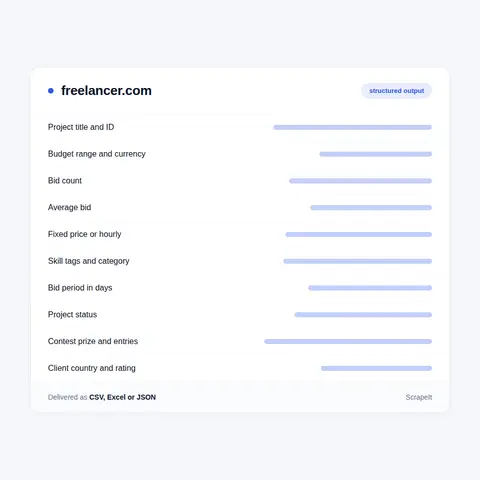
  • Project identity - numeric project ID, title, slug and canonical URL. The slug is built from the leading skill and the title, usually with the ID appended.
  • Description - the full brief as posted, plus the short preview text used in listings.
  • Budget - minimum and maximum, with the currency code, its sign and the exchange rate carried at the time of capture.
  • Project type - fixed price or hourly. Hourly records add the commitment block, meaning the hours per week and the interval the client asked for.
  • Bid statistics - bid count and average bid, taken from the platform's own bid statistics block. This is the observed price of the work, not an asking rate.
  • Bid period - the number of days the project stays open for bidding.
  • Skills - every skill tag on the project, each with its own ID, slug, name and parent category.
  • Status - the lifecycle state, including active, closed and frozen, alongside the front end state such as open or work in progress.
  • Timestamps - submitted and last updated, as Unix time, so you can build a real posting timeline.
  • Upgrades - the flags a client paid for, including featured, urgent, sealed and NDA, so promoted projects can be filtered out of a rate study.
  • Client context - the country and city shown on the project, the client rating, the review count, the join date and whether the project is remote or local.
  • Attachments and qualifications - the file list and any qualification requirements attached to the brief.

Contests are collected on their own schema: prize amount and currency, contest type, duration, judging period, entry count, participating freelancer count and the skills the contest is filed under.

Fields We Extract From Freelancer.com Projects
What Freelancer.com Scraping Has To Handle

What Freelancer.com Scraping Has To Handle

Browse pages live under /jobs/ with a skill slug and numbered pages appended, and keyword search under /job-search/. Individual projects sit under /projects/. The platform publishes sitemap indexes for projects, contests, profiles and skills, which is a cleaner way to enumerate what exists than guessing at page counts.

robots.txt disallows the query string form of the jobs listing, the legacy browse script and almost everything under /ajax/, and it blocks two named crawlers outright. We honour it, and we keep our schedulers under the rate limits the public endpoints advertise in their own response headers rather than testing where the ceiling really is.

Two limits matter before you scope. Requesting more than a hundred projects in one call does not return more than that, so a wide sweep is a paging exercise that costs real wall clock time. And individual bid rows are not public: the endpoint listing them refuses an unauthenticated request. The aggregate is public, and bid count and average bid survive on projects that have already closed or been frozen.

On personal data. Output is limited to project and marketplace data. Individual freelancer profile records, earnings histories and personal contact details are excluded by default, and we do not build person-level datasets about the people who bid. Profile records describe identifiable individuals, which is where the GDPR applies. We also do not attempt to defeat bot protection and we do not collect anything behind a login.

What Freelancer.com Is, In Data Terms

Freelancer.com is a marketplace where work is put out to competitive bidding. A client posts a project with a title, a description, a set of skill tags and a budget range in their own currency. Freelancers then answer it with bids, each carrying its own price and its own delivery period in days. Nothing here is a salary and nothing is a listed price. The number that matters is what the market actually asked for the job.

Projects come in two shapes. A fixed price project sets a budget range, such as 30 to 250 in the client's currency. An hourly project sets an hourly range and adds a commitment block with the hours per week the client expects. Both carry a bid period in days. Contests run as a separate mode: the client funds a prize up front, freelancers submit finished entries instead of bids, and the record carries the prize, the judging period and the entry counts.

The site is operated by Freelancer Limited, an Australian company headquartered in Sydney and listed on the ASX under the code FLN. The group also owns Escrow.com and Loadshift, though neither shares the project data model described here.

Project pages are served by a JavaScript application, but the server still renders the title, the description, the skill tags, the budget range, the project ID and the client block into the HTML. That block prints the client's city and country, their rating, their review count and the date they joined.

Get a Quote

dev_w
25

Developers

customers
500+

Customers worldwide

pages
1 500 000 000+

Pages extracted

stime
15000+

Hours saved for our clients

Plans

Airplane

€199 / one-time

setup fee - included

Data limits100,000
Frequencyone-time
Run timeup to 5 days
Data storing7 days

Helicopter

€169 / mo

setup fee €499

Data limits250,000
Frequencymonthly
Run timeup to 5 days
Data storing14 days

Glasses

€229 / mo

setup fee €499

Data limits1,000,000
Frequencyweekly
Run timeup to 5 days
Data storing30 days

DNA

€549 / mo

setup fee €799

Data limits3,000,000
Frequency3 times daily
Run timesame day
Data storing90 days

Why Buyers Scrape Freelancer.com

A rate card is a guess. A bid is a commitment. When a client posts a budget range and forty freelancers answer it with a price and a delivery date, the average bid on that project is a real price signal for that scope, in that skill, in that week. Very few public sources publish anything comparable.

Teams scrape Freelancer.com to answer three questions that are otherwise hard to settle. What does this kind of work actually clear at, by skill and by budget tier. How far does the average bid sit from the budget the client set, and does that gap move across the year. How much competition does a project in a given skill attract, measured by bid count rather than by anecdote.

The second use is demand measurement. Skill tags are structured rather than free text, so counting projects per skill per week gives a clean series. New tags appearing in the taxonomy show what buyers have started asking for, and the currency mix shows where the money is coming from.

The third is pricing and positioning. Agencies use it to set floor prices. Tool vendors use it to size a category before building for it. Researchers use it because the price of remote skilled work is rarely written down in public anywhere else.

Our Blog

Reads Our Latest News & Blog

Learn how to use web scraping to solve data problems for your organization

How Artificial Intelligence Is Used In Web Scraping

How Artificial Intelligence Is Used In Web Scraping

Leveraging advances in technology, the AI-powered web scraper has skyrocketed in demand and is helping to expand capabilities by automating tedious daily tasks and speeding up data collection from thousands of websites several times over.

What is Web Scraping and What is it Used For?

What is Web Scraping and What is it Used For?

Web scraping is a method of obtaining web data by extracting it from pages of web resources with the help of a program, that is, in automatic mode. It is used to syntactically convert web pages into more usable forms.

Web Scraping for Machine Learning

Web Scraping for Machine Learning

If you specialize in machine learning, you need to feed large amounts of data to the algorithms. Web scraping is the easiest and the most efficient method of collecting the data from all over the Internet.

scrapeit logo

Working With ScrapeIt

ScrapeIt is a managed web scraping agency. We are not selling a library or a browser plugin. We scope the dataset with you, write the crawler, run it, monitor it and repair it when the source moves. You receive clean files or an API call. Nothing to install and no proxy pool to look after.

Scoping starts with a short call about the decision the data has to support. That usually changes the field list, and changing it before the first run is cheaper than changing it after.

FAQ

Does Freelancer.com have a public API?

Yes, and you should know what it covers before paying anyone to scrape. Freelancer.com documents a developer API and publishes an official Python SDK; authenticated calls pass an OAuth token in a Freelancer-OAuth-V1 header. In practice the project search and skills endpoints answer without a token at all. You can pull active projects with budget, currency, project type, skill tags and bid statistics, filter by skill, project type, country, language, price band and time window, and read the whole skills taxonomy. The limits are real. Requests for more than a hundred projects in one call do not return more. The response headers advertise a rate limit of 200 requests per minute and 1000 per hour. The endpoint that returns individual bid rows refuses unauthenticated requests, and employer detail comes back empty on the public search. If the API answers your question, use it, and we will say so. Teams come to us when the work is continuous collection at volume, deduplication across passes, history the API does not retain, and a delivered file instead of a maintenance task.

Can you get the individual bids on a project, not just the average?

Not from public data. The bids endpoint returns a not-authenticated error to any request without a session, and we do not collect behind a login. What we do collect is the platform's own bid statistics block: bid count and average bid, per project, on every pass. Because we capture it repeatedly, you also get how those two numbers move while the project is still open, which is usually the thing people wanted when they asked for the bid list.

Can I get freelance rates by skill from Freelancer.com data?

That is the main reason this dataset exists. Projects are tagged against a structured skills taxonomy rather than free text. When we last read the public skills endpoint it returned 3,482 skills grouped into 17 categories, including Websites, IT and Software, Design, Media and Architecture, and Writing and Content. Join skill to budget range, project type and average bid and you have observed pricing per skill per period. Split fixed price from hourly before you aggregate; they are different distributions and mixing them produces nonsense.

Do you collect freelancer profiles and their earnings?

No, not by default. A profile is a person-level record: hourly rate, country, review history, earnings and completion statistics about an identifiable individual. We exclude that material and we do not build or sell person-level datasets about freelancers. Our output is project and marketplace data - the brief, the budget, the skills, the bid statistics and the marketplace context around them.

Can you scrape Freelancer.com contests and closed projects?

Yes to both, with one caveat. Closed and frozen projects still come back with their bid count and average bid intact, so a project stays useful after the work has been awarded. Contests are a different object and we collect them on their own schema: prize amount and currency, contest type, duration in days, judging period, entry count and the skills the contest is filed under. The caveat is history. Neither we nor the platform can hand you a bid average from before collection started, so if you need a time series, the first run is the beginning of it.

How does it Work?

Step 1 - Make a Request

You share your needs, expectations, and desired timeframe. We’ll suggest the best solution based on your request and budget.

Step 2 - Configuring Custom Web Crawlers

Our specialists configure the crawlers and extract a sample dataset for your review before proceeding with the full-scale extraction.

Step 3 - Collect and Deliver

Once you approve the sample, we launch the project and start full data collection. We gather, filter, and structure the data for easy use, delivering it on time in your preferred format.

Step 4 - Maintain and Support

Our team manages ongoing processes, monitors website changes, and supports all data extraction cycles. We can also help integrate data into your systems or create dashboards to simplify analysis.

Request a Quote

Tell us more about you and your project information.
Which sites, which fields, how often. A couple of lines is enough.

We reply within 1 business day. No obligation.

scrapiet

Scrapeit Sp. z o.o.
10/208 Legionowa str., 15-099, Bialystok, Poland
NIP: 5423457175
REGON: 523384582