Google Scholar Scraper for Search Results, Cited by Counts and Scholar Metrics

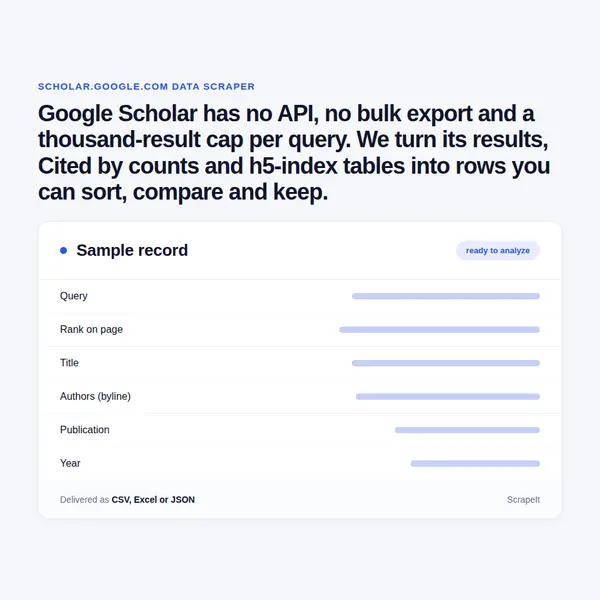
Google Scholar has no API, no bulk export and a thousand-result cap per query. We turn its results, Cited by counts and h5-index tables into rows you can sort, compare and keep.

Google Scholar Scraper
Solutions

Google Scholar Scraper API or Scheduled Files, Run by ScrapeIt

A Google Scholar data collection project starts with scope, not code. Scholar's robots.txt closes the results path, so before the first request we agree with you, and with your counsel, which queries, slices and fields the run covers. ScrapeIt then builds the collector, runs it and repairs it when Scholar changes its markup. Anti-bot handling, proxy rotation and CAPTCHA solving are part of the managed service. The collector stays signed out: no Scholar Labs, no Quick Read, no personal library, no institutional links.

A sample comes first. After that the same rows arrive on your schedule as CSV, JSON, XLSX, BibTeX or RIS, through a Google Scholar scraper API endpoint we host, or pushed to S3, SFTP or your warehouse.

Scrape Google Scholar Citations, Versions and PDF Links, Field by Field

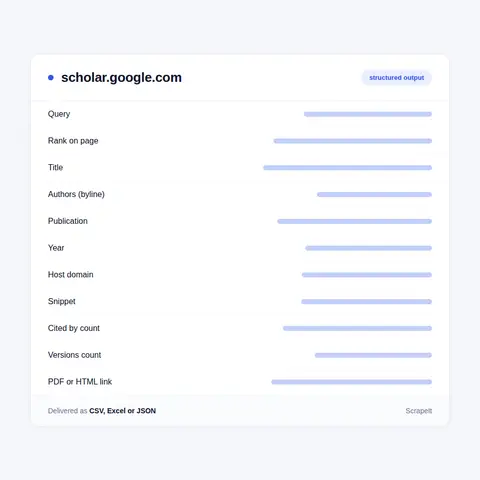
A Scholar result is a dense block, and each part becomes its own column when we extract Google Scholar data. These are the parts, under Scholar's own labels.

  • Title. The title as Scholar parsed it, linked to the page that hosts the work. Works that other papers cite but Scholar has not found online come back marked [citation] and carry no link; we flag them instead of dropping them.
  • Byline. Authors as initials and surname, then the publication, the year and the host domain, all on one line. Long author lists and long journal names are cut with an ellipsis, so the byline alone never gives a complete author list.
  • Snippet. A few lines of text around the query terms. It changes with the query, so we store it against the query that produced it.
  • PDF link. The [PDF] or [HTML] access link to the right of a result and the domain behind it: an open access article, a repository copy, a preprint. Library links tied to a university subscription belong to the viewer's institution and stay out.
  • Cited by. The Cited by count and the list of citing papers behind it, which is how forward citations are collected for a set of seed papers.
  • Versions and related work. The All versions link, with every copy in the cluster and its host, and Related articles, Scholar's own list of similar documents.
  • Cite formats. The same record as Scholar formats it for BibTeX, EndNote, RefMan and RefWorks.
  • Context. Query, rank on the page, year filter, capture date and the estimated result count, so every row traces back to the search that found it.

When a row needs the full author list, volume, issue and pages, we follow the title link to the source page. Publishers carry those details in the meta tags Scholar itself reads to build its records: citation_title, citation_author, citation_publication_date, citation_journal_title, citation_volume, citation_issue, citation_firstpage and citation_pdf_url. The Scholar row and the publisher metadata arrive as one record.

Scrape Google Scholar Citations, Versions and PDF Links, Field by Field
Scholar Metrics: The Google Scholar Ranking of Journals by h5-index

Scholar Metrics: The Google Scholar Ranking of Journals by h5-index

Scholar Metrics is where Scholar ranks publications instead of papers, on pages robots.txt leaves open. The h5-index is the largest number h such that h articles a publication issued in the last five complete years were cited at least h times each; the h5-median is the median count of those h articles. The release currently online uses the index as of July 2025 and covers articles from 2020 to 2024, with Nature leading the English list on an h5-index of 490 and an h5-median of 784.

Selected engineering and computer science conferences share the tables with journals, which makes them a Google Scholar ranking of conferences too: CVPR is second in English, NeurIPS seventh, ICLR eighth. There are top 100 lists for 11 languages and top 20 lists for close to three hundred subcategories, browsable in English only. The robots file closes the h5-core article lists behind each number, so a Metrics feed is publication level.

The public access mandates table rates funders, not people: more than two hundred agencies, each with the share of mandated articles publicly available per year and overall, offered by Scholar as a CSV file. Author profiles, with their h-index and i10-index, belong to the scholars who publish them; we collect metrics at the level of the article and the publication and do not sell profiles of people as personal dossiers.

Google Scholar Scraping: Papers, Versions, Case Law and a Thousand-Result Cap

Google Scholar is Google's free search engine for scholarly literature, and a Google Scholar scraper works on its result pages rather than on a catalogue, because Scholar indexes papers, not journals. The index takes journal and conference papers, theses and dissertations, academic books, preprints, abstracts and technical reports, plus patents and a case law corpus of US court opinions that reaches back to the earliest Supreme Court cases. There is no Google Scholar subscription price; the cost sits with the full text, which often needs a publisher subscription.

Google Scholar search results are ranked the way researchers weigh a paper: its full text, where it appeared, who wrote it, and how often and how recently it has been cited. Versions of a work, from preprint to repository copy to publisher PDF, are grouped into one cluster, and the publisher's full text becomes the primary version whenever Scholar can crawl it. Bibliographic data is extracted by software, so titles and bylines carry the occasional parsing error, and a correction made at the source takes six to nine months or longer to show. New papers arrive several times a week.

Two limits shape any Google Scholar web scraping plan. A query shows a thousand results at most, and the count printed above the list is an estimate drawn from part of the index, not a census. Results sort by relevance or by date added, never by citations, so any ranking by impact has to be built from the rows.

Get a Quote

dev_w
25

Developers

customers
500+

Customers worldwide

pages
1 500 000 000+

Pages extracted

stime
15000+

Hours saved for our clients

Plans

Airplane

€199 / one-time

setup fee - included

Data limits100,000
Frequencyone-time
Run timeup to 5 days
Data storing7 days

Helicopter

€169 / mo

setup fee €499

Data limits250,000
Frequencymonthly
Run timeup to 5 days
Data storing14 days

Glasses

€229 / mo

setup fee €499

Data limits1,000,000
Frequencyweekly
Run timeup to 5 days
Data storing30 days

DNA

€549 / mo

setup fee €799

Data limits3,000,000
Frequency3 times daily
Run timesame day
Data storing90 days

Why Teams Scrape Google Scholar Data Instead of Exporting It

Scholar is built for reading, not for counting. The only Google Scholar export is the Cite button, one record at a time; alerts arrive as emails; and Google states that it cannot provide bulk access to Scholar records. There is no Google Scholar database download either, so a Google Scholar dataset has to be assembled from result pages, one query and one slice at a time.

The rows answer what the interface cannot. You can sort Google Scholar results by number of citations only once they sit in a table. A publisher can track Cited by counts across a journal backlist, a pharma team can watch who cites the trials behind a compound, and a research office can compare its output with peer institutions without keying titles by hand. Counts also fall as well as rise, because Scholar reflects the web as its robots see it today, so only stored snapshots show when a number moved.

Is Google Scholar a good database for this? For reach, yes: citing documents include theses, preprints and technical reports from repositories and personal pages, well beyond journal literature. For precision, it needs care: extraction is automated, versions are grouped by software, and a Scholar count is not interchangeable with one from a curated citation index. Bibliometrics and Google Scholar data mining work best with the two kept in separate columns.

Our Blog

Reads Our Latest News & Blog

Learn how to use web scraping to solve data problems for your organization

What is the Scraping Web Data for Sentiment Analysis & How it Helps Marketers and Data Scientists

What is the Scraping Web Data for Sentiment Analysis & How it Helps Marketers and Data Scientists

The use of sentiment analysis tools in business benefits not only companies but also their customers by allowing them to improve products and services, identify the strengths and weaknesses of competitors' products, and create targeted advertising.

Empower Your Business with Google Maps Data

Empower Your Business with Google Maps Data

Using web scraping to extract Google Maps data will help you quickly and efficiently find businesses in any industry, city, state, or region. And the extracted contact information, such as phone or email address, social networks, or links to web pages, will help to contact them.

How to Generate Business Leads Using Web Scraping

How to Generate Business Leads Using Web Scraping

Lead scraping is a reliable way to get the right customer contacts to market your product, saves organizations time, and helps you better understand the audience you want to attract. Contacts include emails, phone numbers, or social media profiles.

scrapeit logo

Working With ScrapeIt on Google Scholar Data Scraping

ScrapeIt is a managed data collection agency. We write the collectors, run them on our own infrastructure, fix them when a site changes and hand over clean files, so you maintain no code and manage no proxies.

We also scope honestly. If an open scholarly index answers your question more cheaply than a crawl, or the result set is small enough to work through by hand, you hear that on the first call, before any invoice.

FAQ

Does Google Scholar have an API?

No. Google publishes no Google Scholar API, so there is no Google Scholar API key to request and no Google Scholar API pricing to compare. Scholar's help says Google cannot provide bulk access to its records and sends you to the original sources, many of them subscription services. Anything sold as a Google Scholar search API is a third party collecting the same result pages. Google Scholar Labs, the AI search mode, has no API either and runs only for signed-in users. If a documented API matters more than Scholar's reach, a Google Scholar alternative with a public API, such as Crossref, OpenAlex or Semantic Scholar, fits better.

Can you export Google Scholar results to CSV or Excel?

Yes, that is the usual delivery. Scholar exports one record at a time through the Cite button, in BibTeX, EndNote, RefMan or RefWorks, and has no bulk export for a result list. We deliver the whole list as CSV, JSON or XLSX, one row per result with query, rank, title, byline, year, Cited by count, versions count and PDF link, so anyone who needs to export Google Scholar results to Excel gets a sheet that already sorts and filters. BibTeX or RIS files for a reference manager come from the same rows.

How do you get past the thousand-result limit on a Google Scholar search?

By never asking for more than a thousand at once. Scholar shows at most a thousand results for any query, and the total it prints is an estimate, so a Google Scholar crawler that simply pages forward stops short on any large topic. We split the search before collection: by year range, by publication, by author, by words in the title, sometimes by all four. Each slice stays under the cap, duplicates are removed on the version cluster, and every slice is logged, so a systematic search can be rerun and checked.

How often can a Google Scholar feed be refreshed?

Match the cadence to the field. Scholar adds new papers several times a week, so a watchlist of queries for new additions runs weekly or twice a week. Cited by counts drift as the index changes, so monthly snapshots show the trend without paying for noise. Corrections to existing records take Scholar six to nine months or longer, so titles and bylines rarely need collecting again. Scholar Metrics change only with a new release, which has come about once a year, and each release is collected once and kept beside the last.

Is scraping Google Scholar legal?

It depends on your use and your jurisdiction, and we are not your lawyers. Scholar's robots.txt disallows /scholar, the path behind every result page, Cited by list and court opinion, and Scholar's help asks anyone running automated software to respect that file. Google's Terms of Service forbid automated access that breaks robots.txt instructions. We raise this before any proposal: the scope of a results project is agreed with your lawyer, and the decision to run it and how the data is used stay with you. The Metrics and mandates tables are on paths the same file leaves open. We never sign in and never build profiles of people.

How does it Work?

Step 1 - Make a Request

You share your needs, expectations, and desired timeframe. We’ll suggest the best solution based on your request and budget.

Step 2 - Configuring Custom Web Crawlers

Our specialists configure the crawlers and extract a sample dataset for your review before proceeding with the full-scale extraction.

Step 3 - Collect and Deliver

Once you approve the sample, we launch the project and start full data collection. We gather, filter, and structure the data for easy use, delivering it on time in your preferred format.

Step 4 - Maintain and Support

Our team manages ongoing processes, monitors website changes, and supports all data extraction cycles. We can also help integrate data into your systems or create dashboards to simplify analysis.

Request a Quote

Tell us more about you and your project information.
Which sites, which fields, how often. A couple of lines is enough.

We reply within 1 business day. No obligation.

scrapiet

Scrapeit Sp. z o.o.
10/208 Legionowa str., 15-099, Bialystok, Poland
NIP: 5423457175
REGON: 523384582